



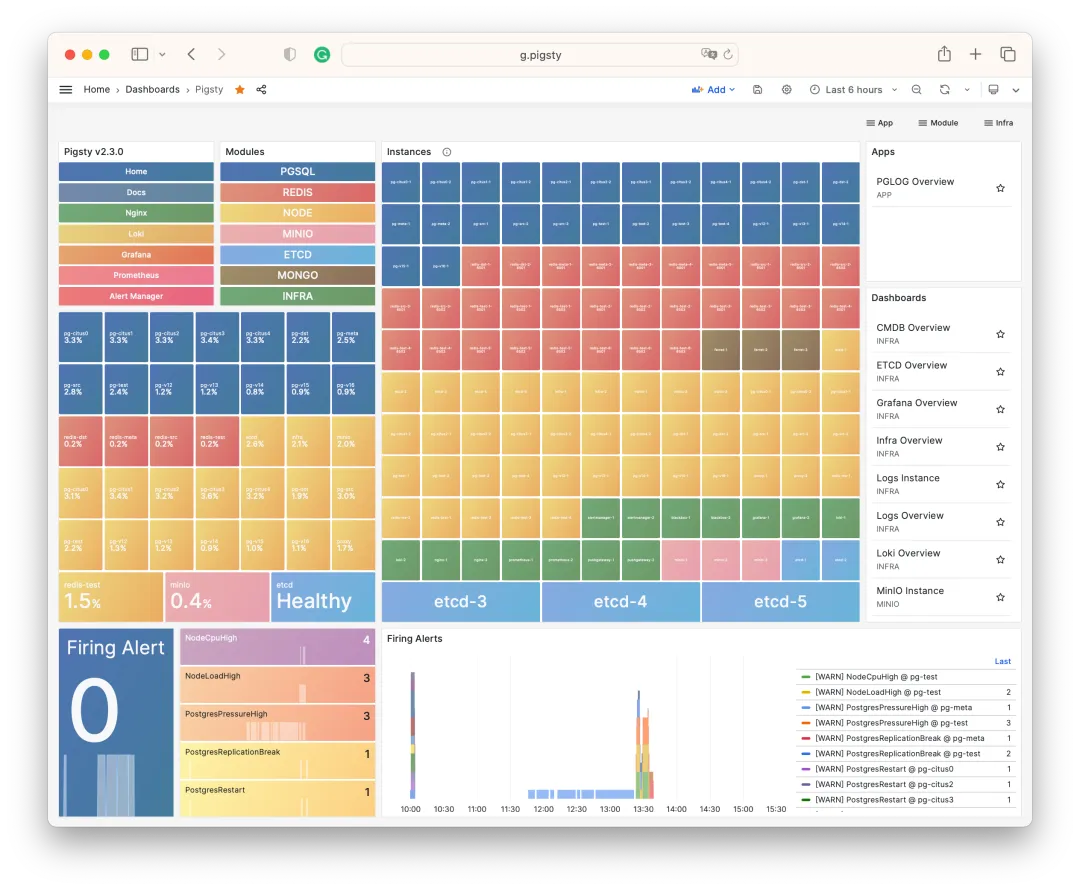
Pigsty v2.3 is here! This release further refines the monitoring system, enriches the application ecosystem, and keeps pace with PostgreSQL’s routine minor version updates (CVE fixes).
Pigsty v2.3 follows PostgreSQL’s minor version updates including 15.4, 14.9, 13.12, 12.16, and 16 beta3, addressing a CVE security vulnerability. The HA controller Patroni is also upgraded to version 3.1, fixing several bugs.
v2.3 adds support for FerretDB — a truly open-source MongoDB alternative built on PostgreSQL. Users can access it with MongoDB clients, but all data is actually stored in the underlying PostgreSQL.
v2.3 also includes NocoDB by default: an open-source Airtable alternative. It’s a database-spreadsheet hybrid that lets you quickly build collaborative applications using a low-code approach.
Pigsty v2.3 introduces the ability to bind an L2 VIP to a host node cluster using the VRRP protocol to eliminate single points of failure across the entire chain, with full monitoring support: keepalived_exporter collects metrics, and every Node VIP (keepalived) and PGSQL VIP (vip-manager) is added to blackbox_exporter’s ICMP/PING monitoring list.
For monitoring, Pigsty v2.3 builds on v2.2’s foundation with additional polish: new VIP monitoring, VIP and node PING metrics prominently placed in NODE/PGSQL monitoring, a new lock wait tree view in PGSQL monitoring, Redis monitoring style updates, MinIO monitoring adapted to new metric names, and MySQL/MongoDB monitoring stubs laying groundwork for future implementation.
MongoDB Support?#
MongoDB is a popular NoSQL document database. But due to licensing issues (SSPL) and positioning concerns (Postgres distribution), Pigsty chose to use FerretDB to provide MongoDB support. FerretDB is an interesting open-source project: it lets PostgreSQL provide MongoDB capabilities.
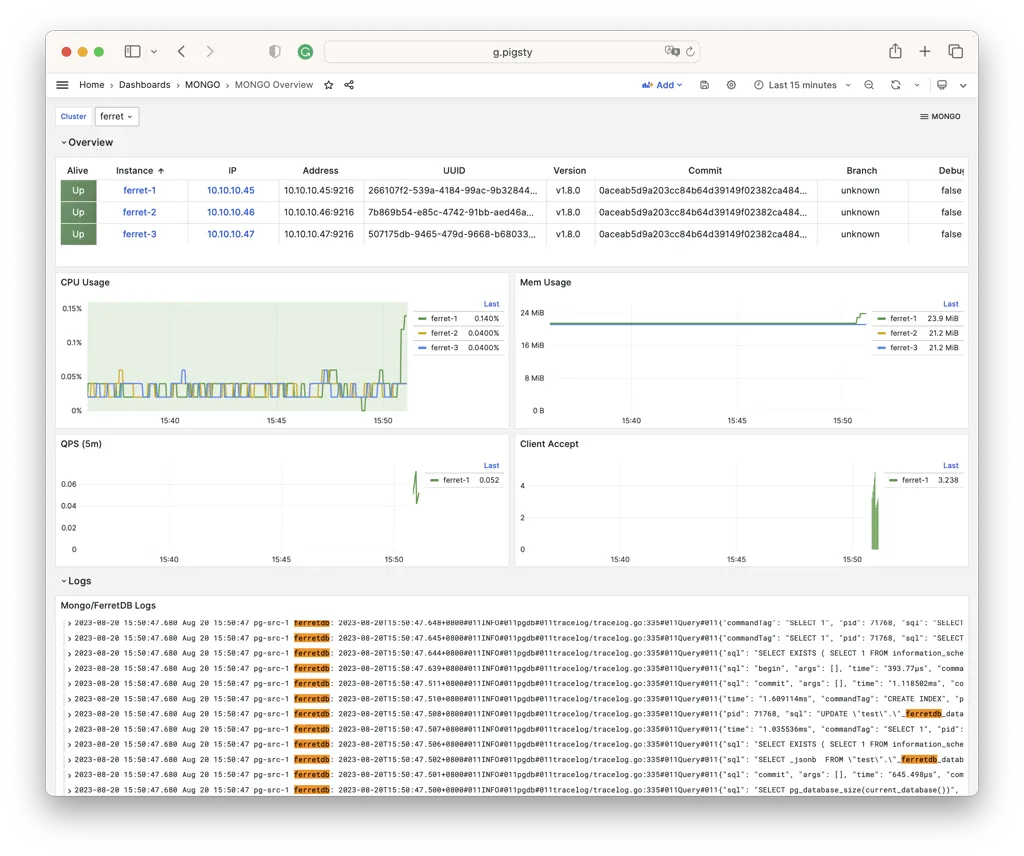
MongoDB and PostgreSQL are very different database systems: MongoDB uses a document model with its own query language. But since PostgreSQL offers complete JSON/JSONB/GIN functionality, this is theoretically entirely feasible: FerretDB translates your MongoDB queries into SQL queries:
use test                            -- CREATE SCHEMA test;
db.dropDatabase()                   -- DROP DATABASE test;
db.createCollection('posts')        -- CREATE TABLE posts(_data JSONB,...)
db.posts.insert({title: 'Post One',
  body: 'Body of post one',
  category: 'News',
  tags: ['news', 'events'],
  user: {name: 'John Doe',
         status: 'author'},
  date: Date()})                    -- INSERT INTO posts VALUES(...);
db.posts.find().limit(2).pretty()   -- SELECT * FROM posts LIMIT 2;
db.posts.createIndex({ title: 1 })  -- CREATE INDEX ON posts(_data->>'title');
Defining a FerretDB cluster in Pigsty is no different from other database types — you just need to provide core identity parameters: cluster name and instance number. The key parameter is mongo_pgurl, which specifies the underlying PostgreSQL address that FerretDB uses.
ferret:
  hosts:
    10.10.10.45: { mongo_seq: 1 }
    10.10.10.46: { mongo_seq: 2 }
    10.10.10.47: { mongo_seq: 3 }
  vars:
    mongo_cluster: ferret
    mongo_pgurl: 'postgres://test:test@10.10.10.3:5436/test'
You can directly specify any PostgreSQL service address created by Pigsty. No special database configuration is needed — just ensure the user has DDL privileges.
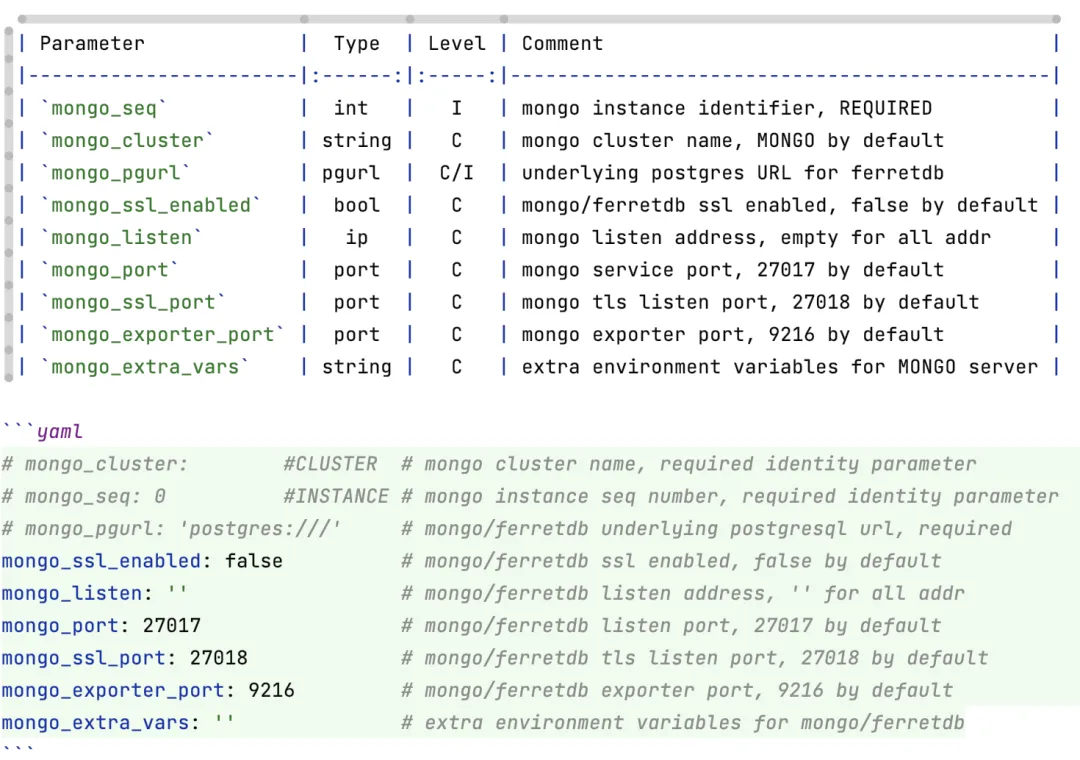
After configuration, run ./mongo.yml -l ferret to complete installation. If you prefer containers, you can also cd pigsty/app/ferretdb; make to spin up FerretDB via docker-compose. Once installed, use any MongoDB client to access FerretDB, such as MongoSH:
mongosh 'mongodb://test:test@10.10.10.45:27017/test?authMechanism=PLAIN'
For users looking to migrate from MongoDB to PostgreSQL, this is a minimal-effort compromise solution. Pigsty also offers another approach via MongoFDW: query existing MongoDB clusters using SQL from within PostgreSQL.
New App: NocoDB#
Pigsty v2.3 adds built-in support for NocoDB. Use the default Docker Compose template to spin up NocoDB with one command and use the built-in PostgreSQL for storage.
NocoDB is an open-source Airtable alternative. What’s Airtable? Think Google Docs / Google Sheets, but with extremely rich APIs and hooks that enable powerful functionality.
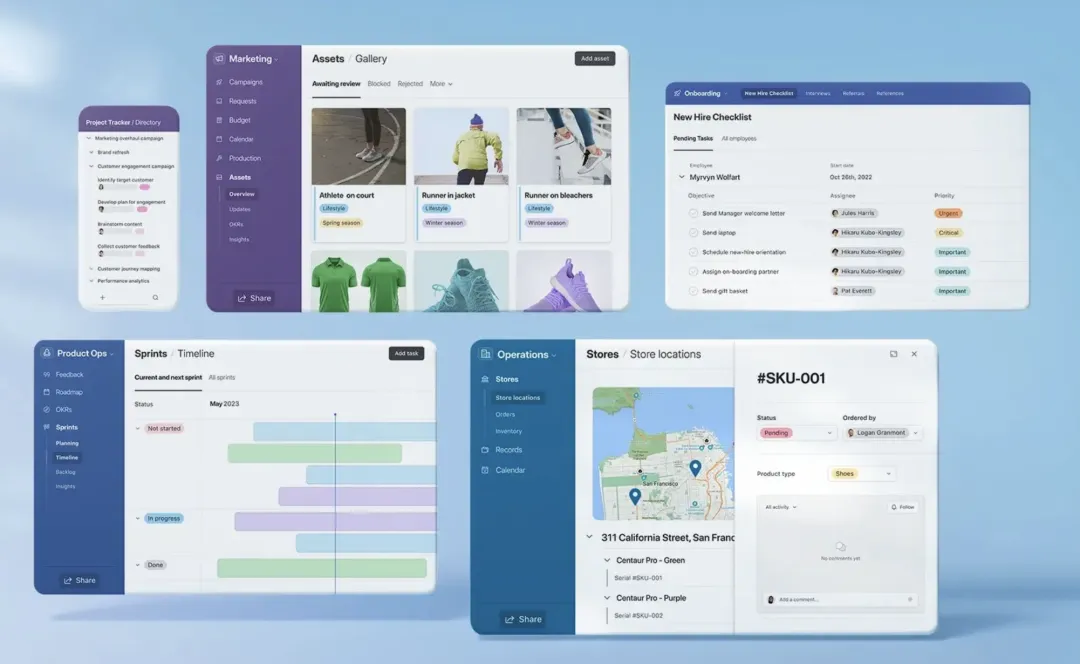
NocoDB transforms any relational database into a spreadsheet, running your own local cloud document software. It also lets users implement requirements via low-code approaches: for example, you can send auto-generated forms to others for filling out, with results automatically organized into real-time shared, collaborative, programmable multi-dimensional tables.
In Pigsty, spinning up NocoDB is dead simple — just one command. Modify the DATABASE_URL parameter in .env to use different databases.
cd ~/pigsty/app/nocodb; make up
Node VIP Support#
Pigsty v2.3 introduces the ability to bind an L2 VIP to a host node cluster using the VRRP protocol to eliminate single points of failure across the entire chain, with complete monitoring support.
In ancient Pigsty versions (pre-0.5), keepalived-based L2 VIP was available but was later replaced by HAProxy + VIP-Manager: HAProxy works with any network, provides flexible health checks and traffic distribution, plus a simple admin interface. VIP-Manager binds an L2 VIP to the database cluster primary.
But the general L2 VIP requirement still exists. For example, if users choose HAProxy cluster access, how do you ensure HAProxy’s own reliability? While DNS-based load balancing works, VRRP clearly wins on reliability and ease of use. MinIO, ETCD, and Prometheus sometimes have similar needs.
Binding an L2 VIP to a cluster is simple: enable vip_enabled, assign a unique VirtualRouterID and VIP address within the VLAN. By default, all cluster members use BACKUP initial state in non-preemptive mode. Set vip_role and vip_preempt to change this behavior.
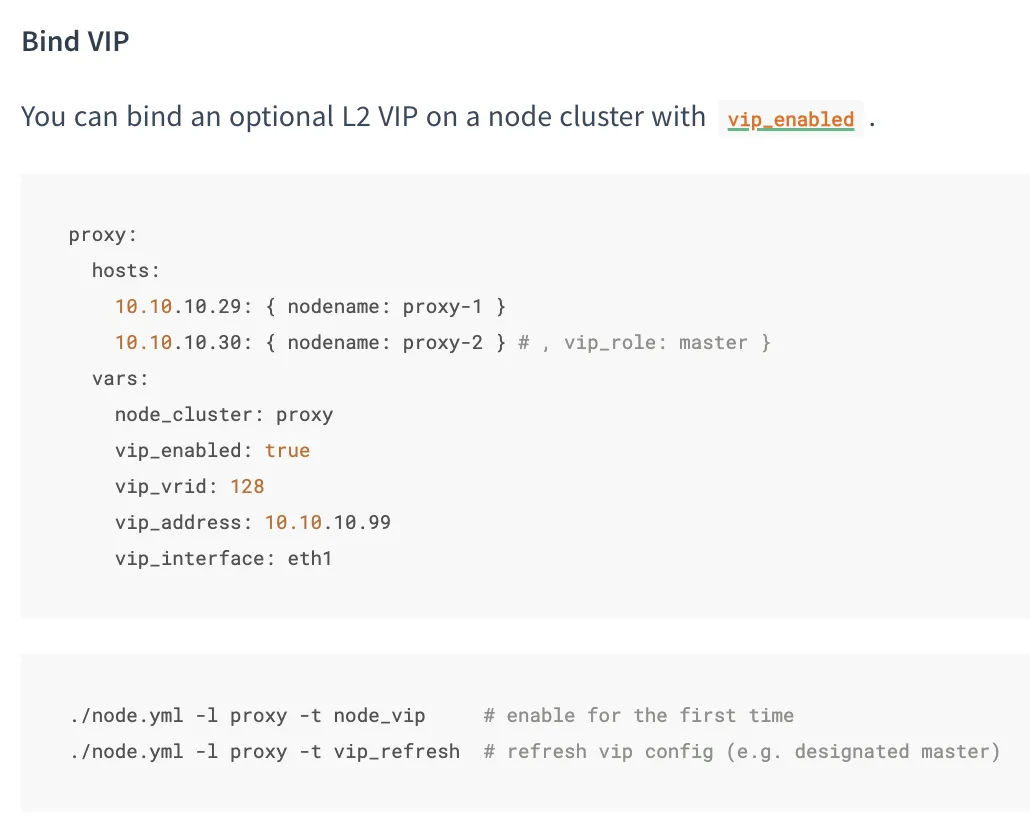
L2 VIPs are automatically monitored. When the MASTER goes down, BACKUP takes over immediately.
Monitoring Improvements#
Pigsty v2.2 completely overhauled the monitoring system based on Grafana 10. v2.3 adds more refinements on top of v2.2.
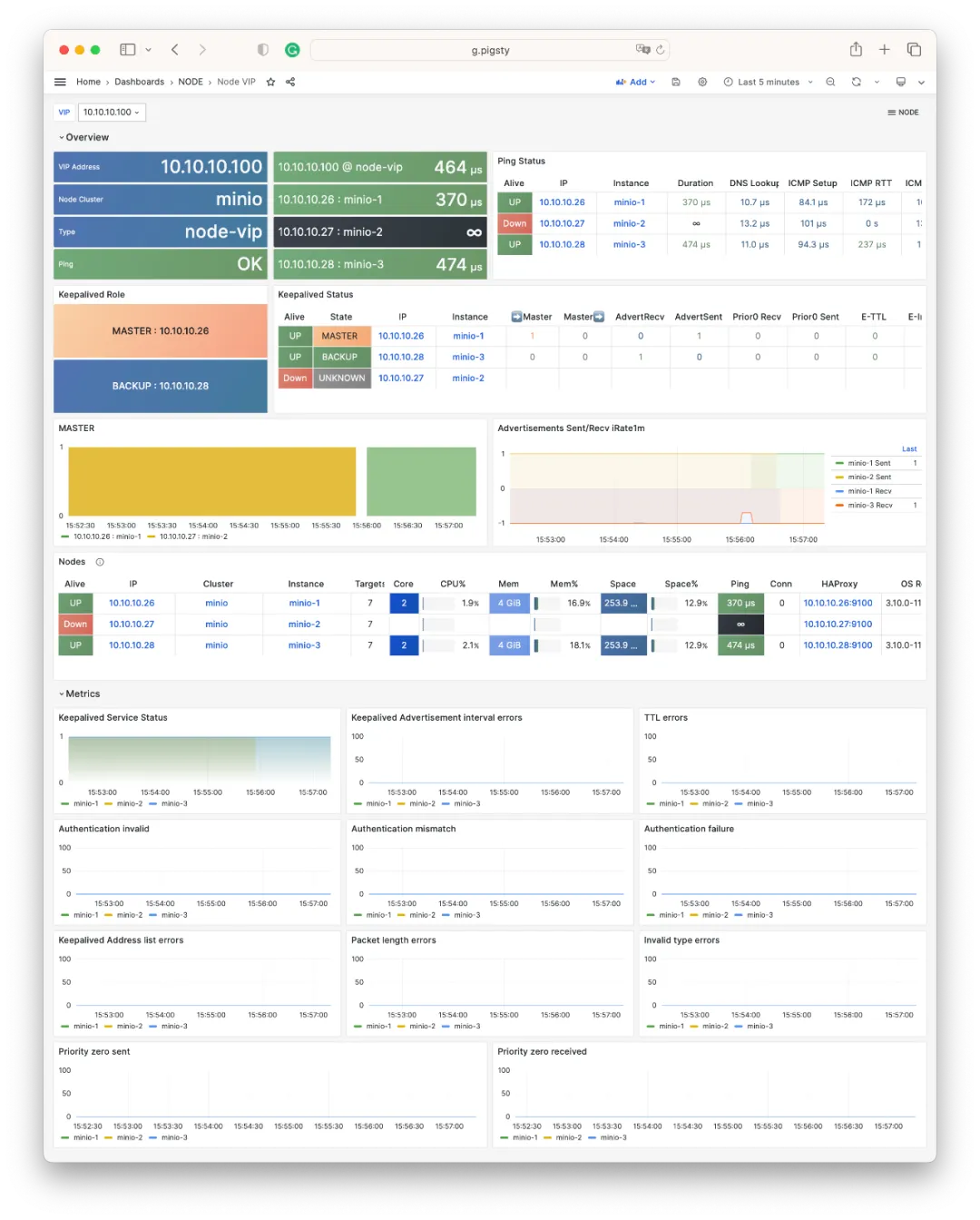
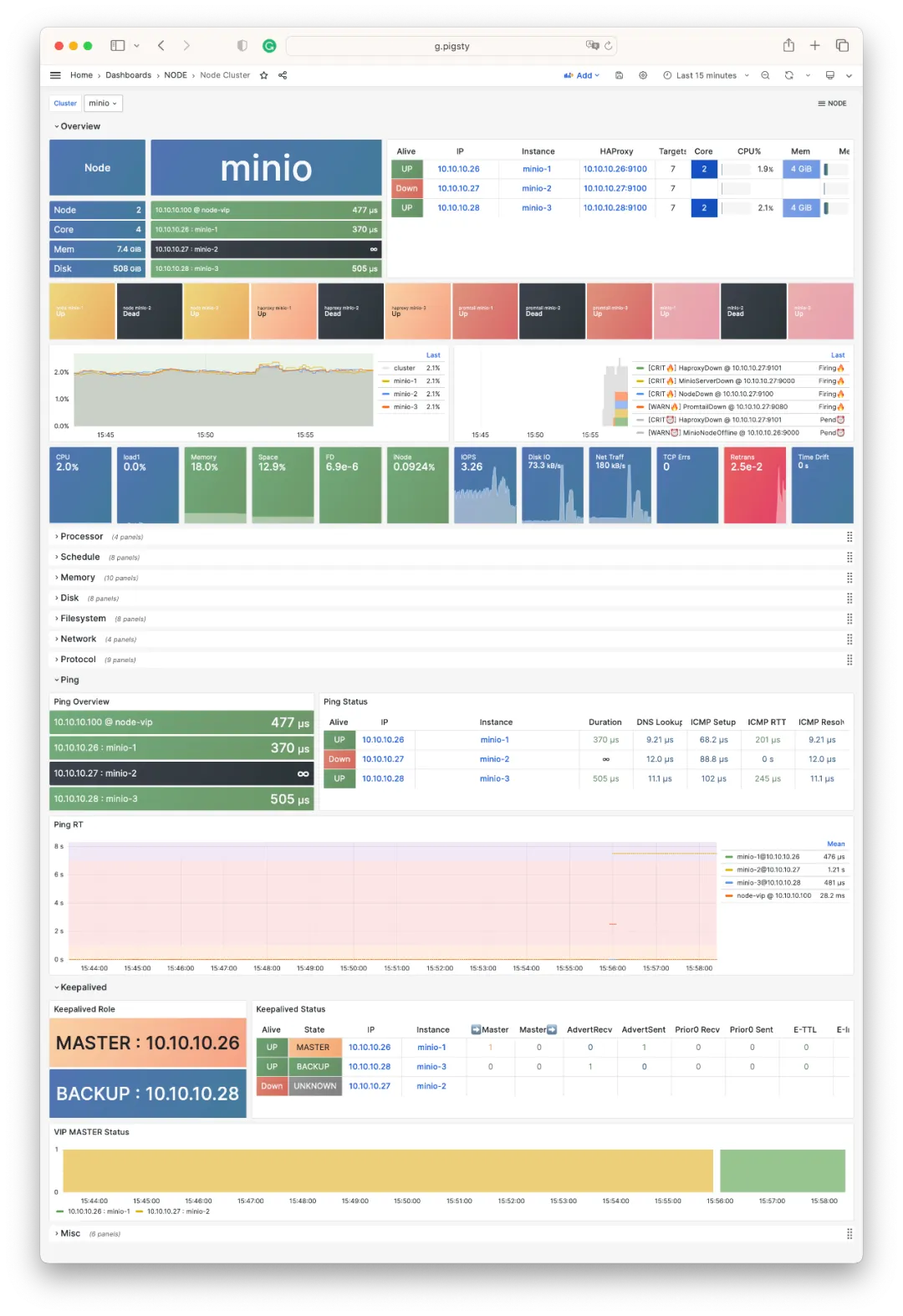
For example, the new NODE VIP dashboard displays VIP status: owning cluster/members, network RT, keepalived state, and more.
The image above shows live monitoring of an L2 VIP automatic failover: bound to a 3-node MinIO cluster. When the original Master (.27) goes down, (.26) takes over immediately.
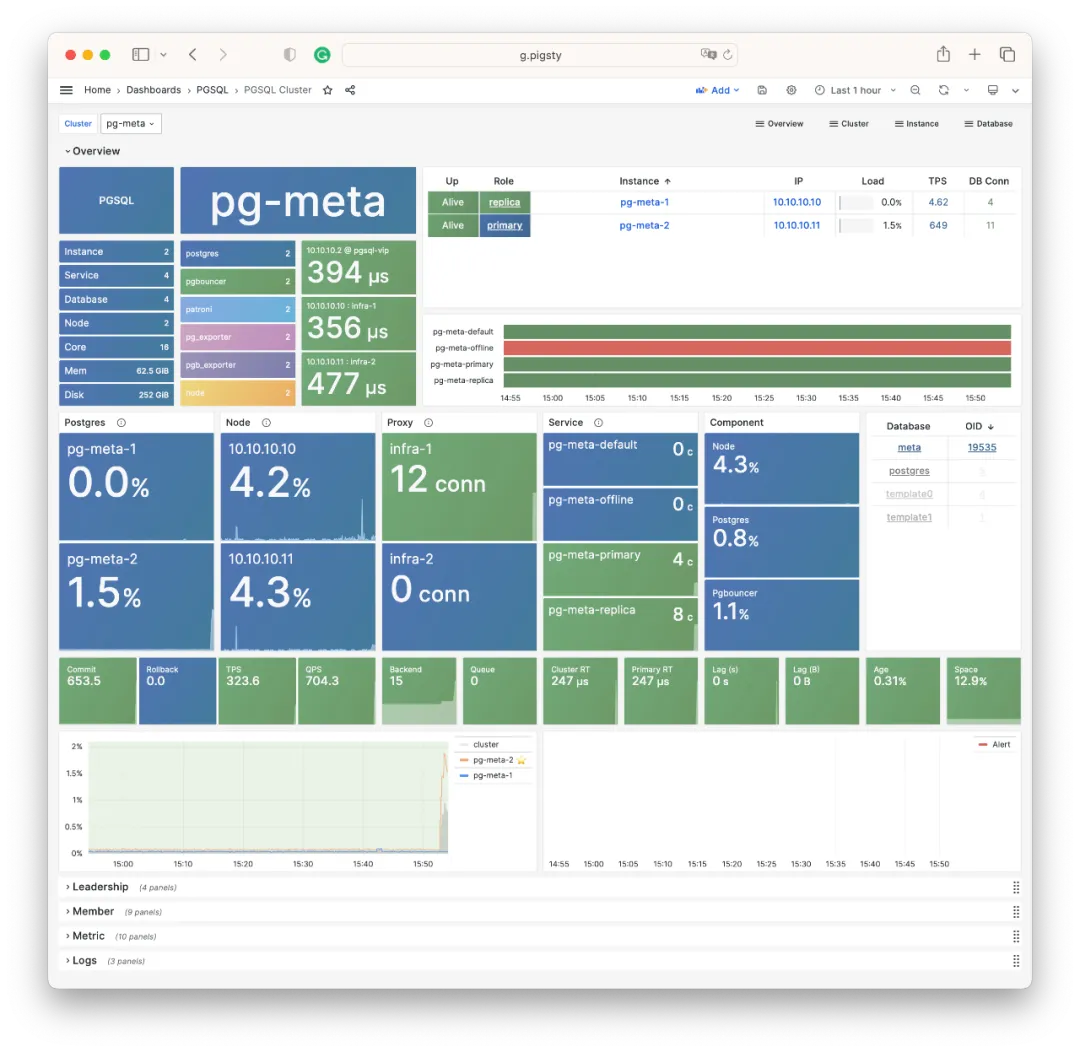
The same information appears in prominent positions on NODE and PGSQL dashboards: for example, the Overview instance list now includes VIP quick navigation (purple):
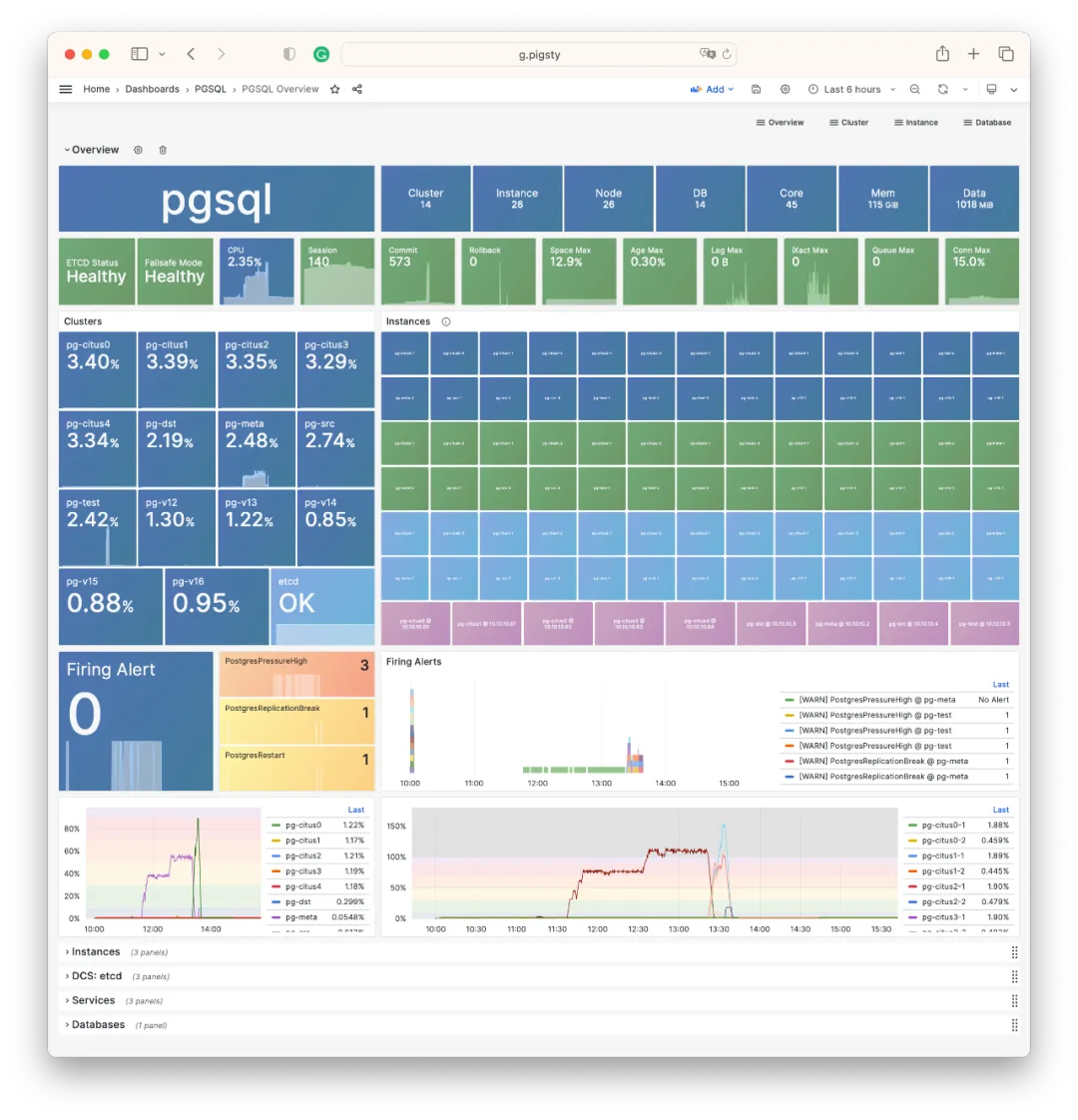
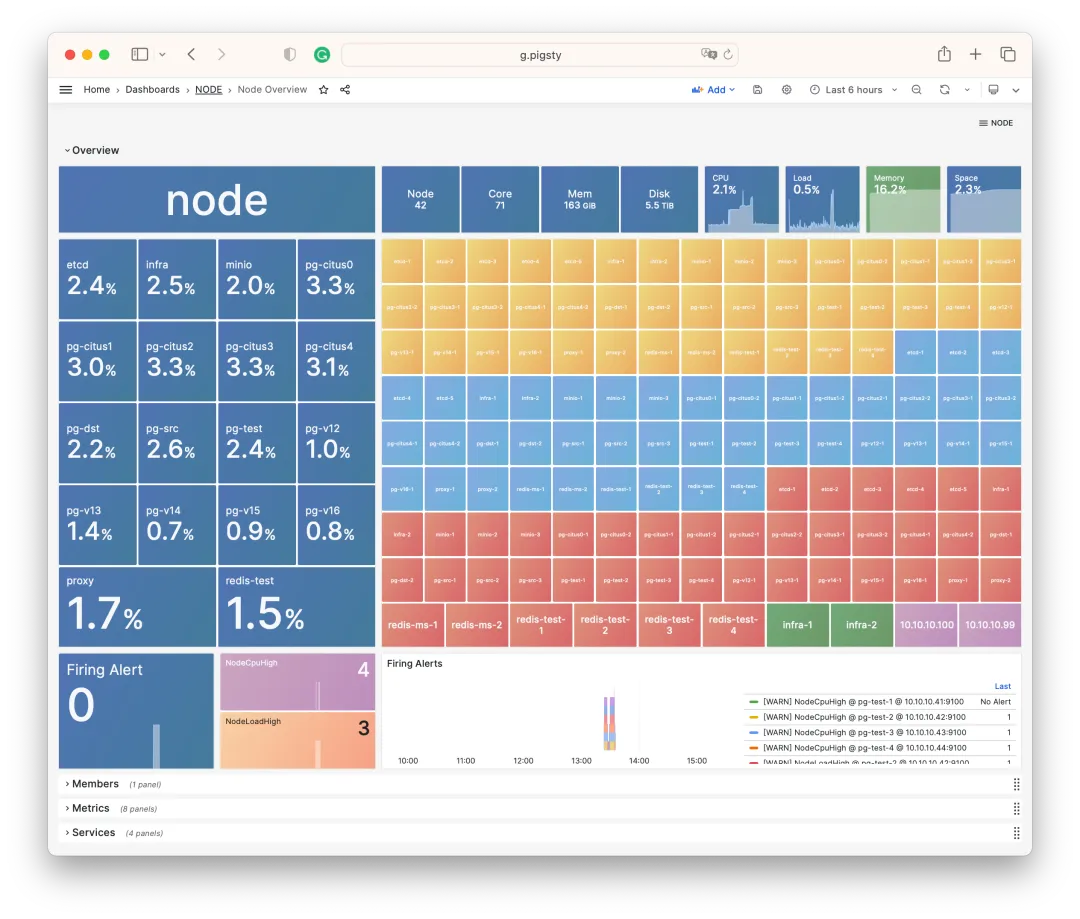
Similarly, NODE Cluster and PGSQL Cluster prominently display VIP and all member ICMP reachability status (Ping network latency).
Additionally, PGCAT adds a default 1-second refresh PGCAT Locks dashboard for intuitive observation of current database activity and lock waits.
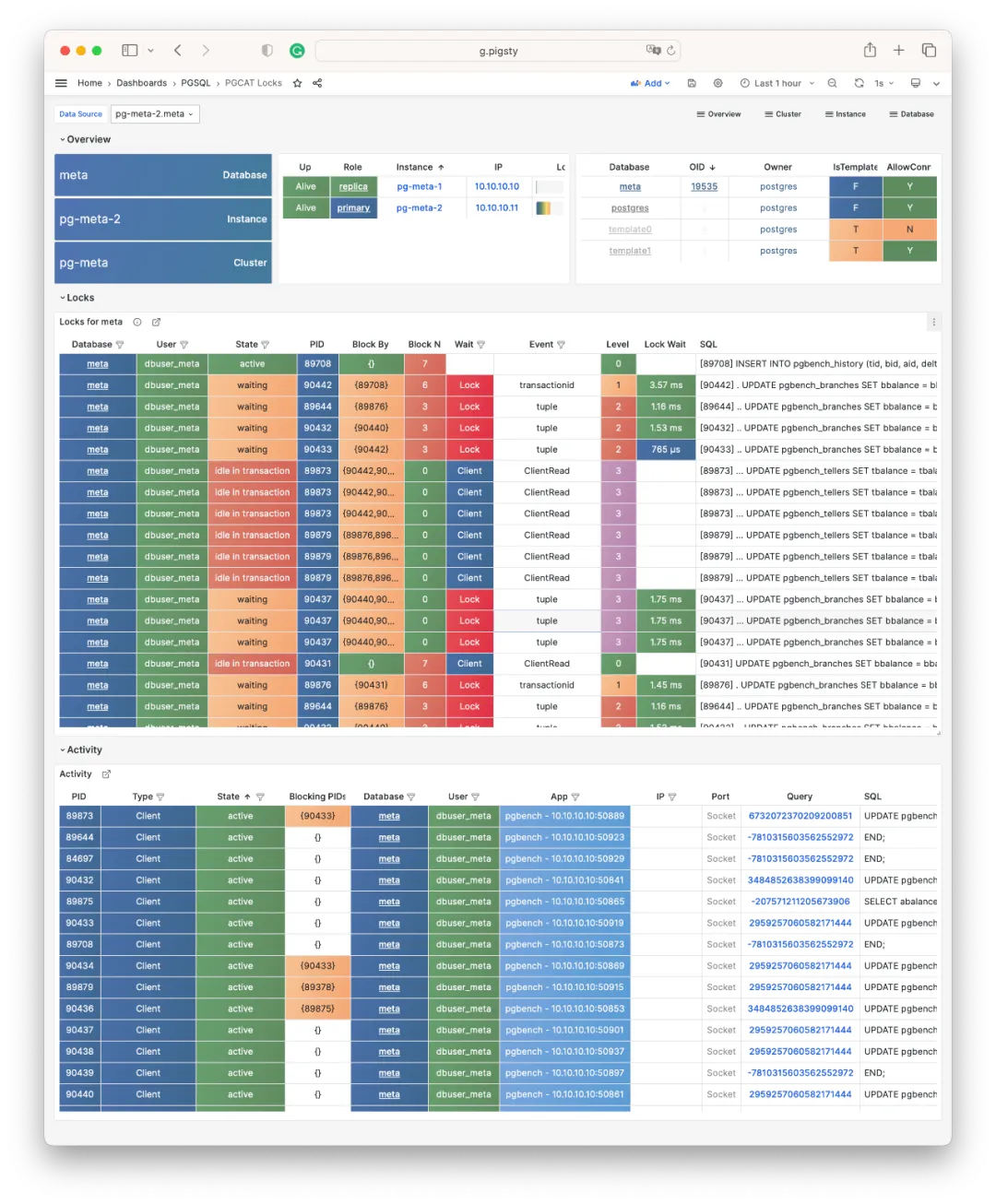
Lock waits are organized into a wait tree, with Level and indentation indicating hierarchy. You can select different refresh rates, up to 10 times per second.
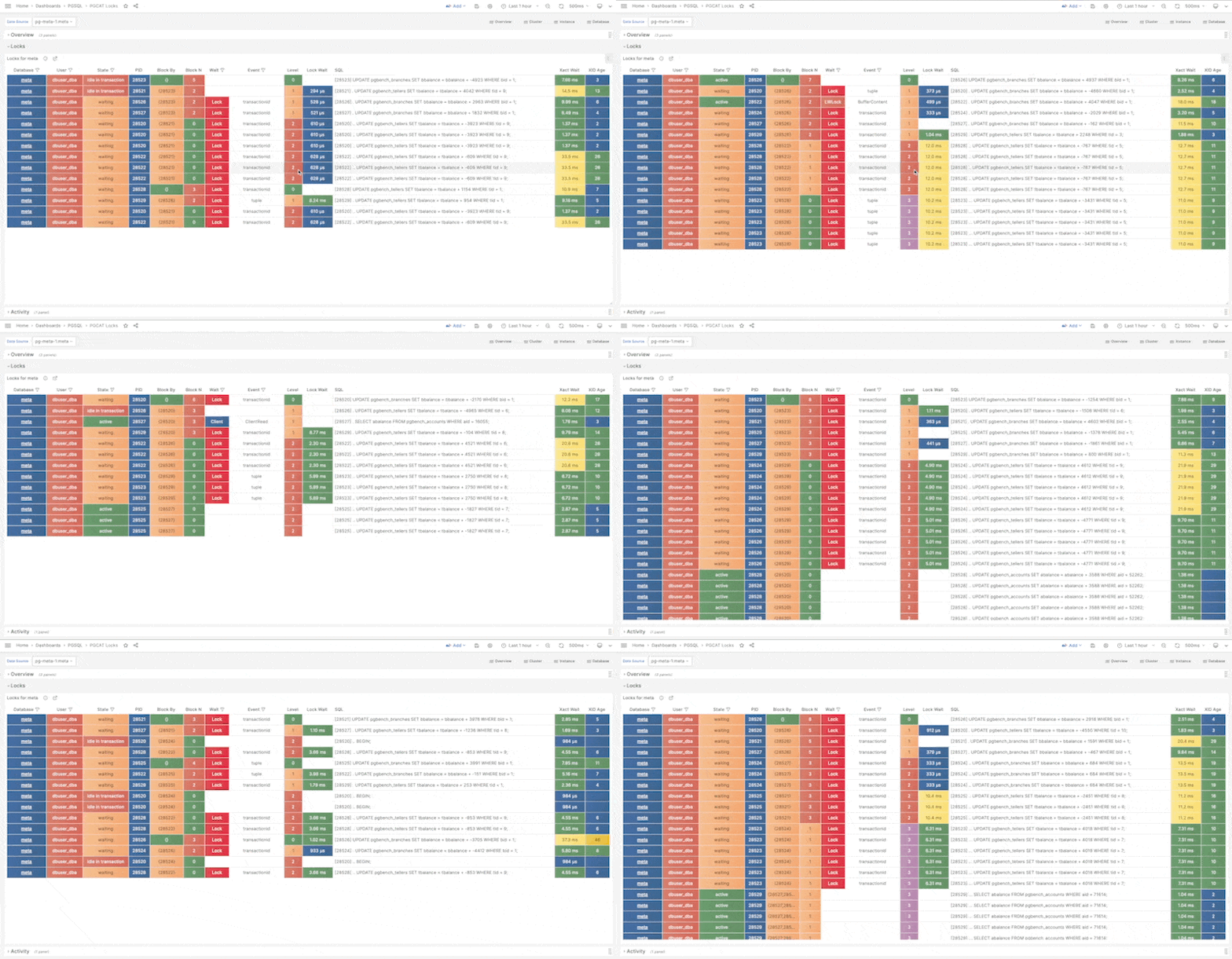
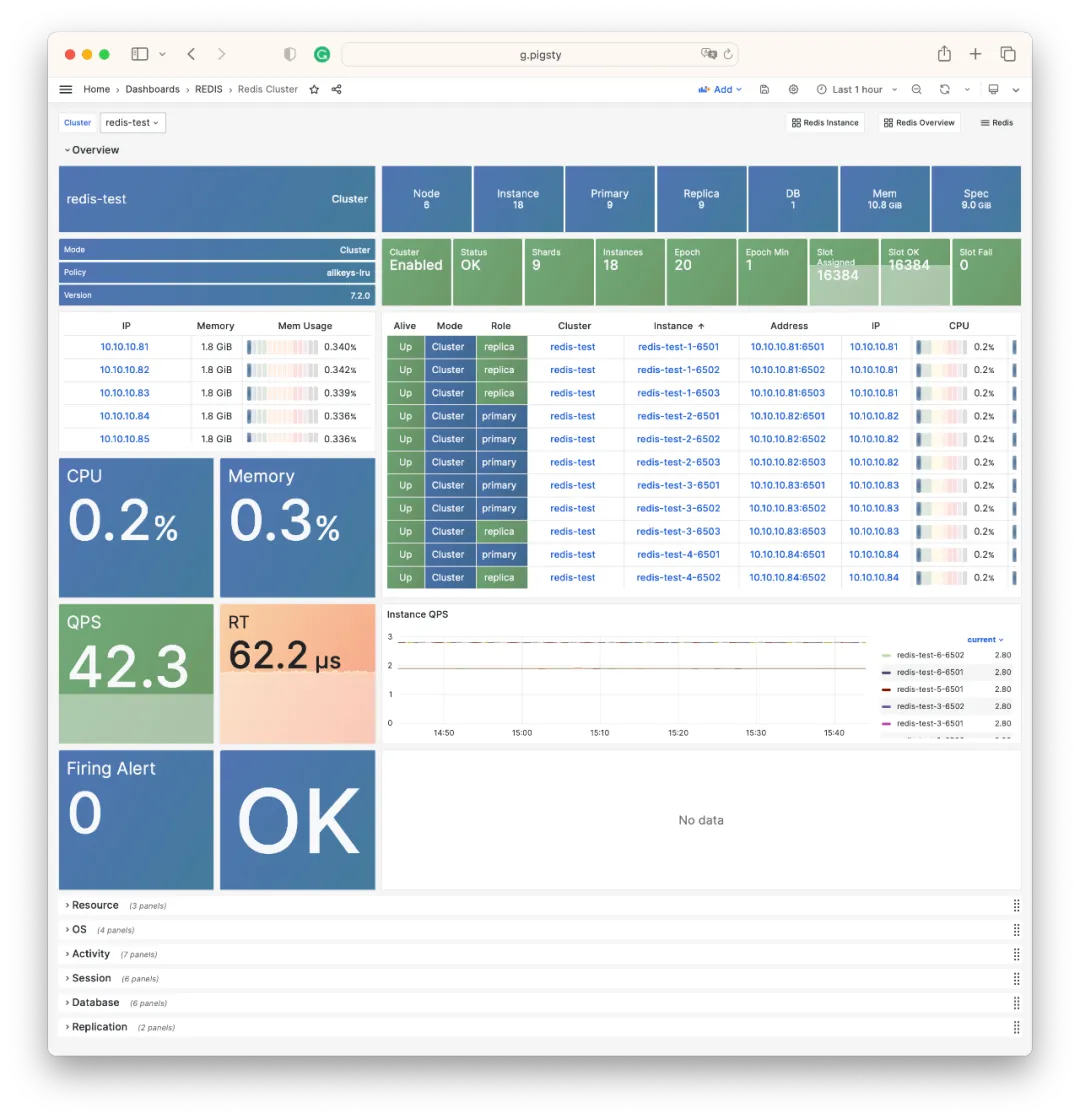
For Redis monitoring, related dashboards have been unified to match PGSQL and NODE styling:
Smoother Build Process#
Pigsty v2.2 introduced official Yum repos; v2.3 enables site-wide HTTPS by default.
When downloading Pigsty software directly from the internet, you might encounter firewall/GFW issues. For example, default Grafana/Prometheus Yum repos can be extremely slow. Additionally, some scattered RPM packages need web URL downloads rather than repotrack.
Pigsty v2.2 solved this with an official Yum repo at http://get.pigsty.cc, configured as a default upstream source. All scattered RPMs and packages requiring VPN access are hosted there, significantly speeding up online installation/builds.
Installation#
The Pigsty v2.3 installation command is:
bash -c “$(curl -fsSL https://get.pigsty.cc/latest)"
One command for a complete Pigsty installation on a fresh machine. For beta versions, replace latest with beta. For air-gapped environments, download Pigsty and offline packages:
https://get.pigsty.cc/v2.3.0/pigsty-v2.3.0.tgz
https://get.pigsty.cc/v2.3.0/pigsty-pkg-v2.3.0.el7.x86_64.tgz
https://get.pigsty.cc/v2.3.0/pigsty-pkg-v2.3.0.el8.x86_64.tgz
https://get.pigsty.cc/v2.3.0/pigsty-pkg-v2.3.0.el9.x86_64.tgz
That’s what Pigsty v2.3 brings to the table.
For more details, check out the official Pigsty documentation: https://pigsty.io and GitHub Release Notes: https://github.com/pgsty/pigsty/releases/tag/v2.3.0
v2.3.0 Release Notes#
Highlights
- INFRA: Added NODE/PGSQL VIP monitoring support
- PGSQL: Fixed PostgreSQL CVE-2023-39417 via minor upgrades: 15.4, 14.9, 13.12, 12.16, and Patroni v3.1.0
- NODE: Allow users to bind L2 VIP to node clusters using
keepalived - REPO: Pigsty Yum repo optimized, site-wide HTTPS by default:
get.pigsty.ccanddemo.pigsty.cc - APP: Upgraded
app/bytebaseto v2.6.0,app/ferretdbto v1.8; added new app template: NocoDB, open-source Airtable - REDIS: Upgraded to v7.2, redesigned Redis dashboards
- MONGO: Added basic support via FerretDB 1.8
- MYSQL: Added Prometheus/Grafana/CA stubs for future integration
API Changes
Added new parameter group NODE.NODE_VIP with 8 new parameters:
NODE.VIP.vip_enabled: Enable VIP on this node cluster?NODE.VIP.vip_address: Node VIP address in IPv4 format, required if VIP enabledNODE.VIP.vip_vrid: Required, integer 1-255, must be unique within same VLANNODE.VIP.vip_role: master/backup, defaults to backup, used as initial roleNODE.VIP.vip_preempt: Optional, true/false, defaults to false, enable VIP preemptionNODE.VIP.vip_interface: Node VIP network interface to listen on, eth0 by defaultNODE.VIP.vip_dns_suffix: Node VIP DNS name suffix, defaults to .vipNODE.VIP.vip_exporter_port: Keepalived exporter listen port, defaults to 9650
MD5 (pigsty-pkg-v2.3.0.el7.x86_64.tgz) = 81db95f1c591008725175d280ad23615
MD5 (pigsty-pkg-v2.3.0.el8.x86_64.tgz) = 6f4d169b36f6ec4aa33bfd5901c9abbe
MD5 (pigsty-pkg-v2.3.0.el9.x86_64.tgz) = 4bc9ae920e7de6dd8988ca7ee681459d
v2.3.1 Release Notes#
Highlights
pgvectorupdated to 0.5 with HNSW algorithm support- PostgreSQL 16 RC1 support (el8/el9)
- Added SealOS to default packages for quick Kubernetes cluster deployment
Bug Fixes
- Fixed
infra.repo.repo_pkgtask: downloads could be affected by existing/www/pigstycontent whenrepo_packagescontains*wildcards - Changed
vip_dns_suffixdefault from.vipto empty string, so cluster name itself becomes the default Node cluster L2 VIP modprobe watchdogandchown watchdogifpatroni_watchdog_modeisrequired- When
pg_dbsu_sudo=limitandpatroni_watchdog_mode=required, grant database dbsu sudo for:/usr/bin/sudo /sbin/modprobe softdog: Ensure softdog kernel module enabled when starting Patroni service/usr/bin/sudo /bin/chown {{ pg_dbsu }} /dev/watchdog: Ensure watchdog ownership correct when starting Patroni service
Documentation Updates
- Added updated content to English documentation
- Added simplified Chinese built-in docs, fixed Chinese docs on pigsty.cc
Software Updates
- PostgreSQL 16 RC1 for EL8/EL9
- PGVector 0.5.0 with HNSW index support
- TimescaleDB 2.11.2
- Grafana 10.1.0
- Loki & Promtail 2.8.4
- Redis Stack 7.2 on el7/8
- mcli-20230829225506 / minio-20230829230735
- FerretDB 1.9
- SealOS 4.3.3
- pgBadger 1.12.2
MD5 (pigsty-pkg-v2.3.1.el7.x86_64.tgz) = ce69791eb622fa87c543096cdf11f970
MD5 (pigsty-pkg-v2.3.1.el8.x86_64.tgz) = 495aba9d6d18ce1ebed6271e6c96b63a
MD5 (pigsty-pkg-v2.3.1.el9.x86_64.tgz) = 38b45582cbc337ff363144980d0d7b64