



2023/02/28, Pigsty v2.0.0 is officially released, bringing a series of major feature updates.
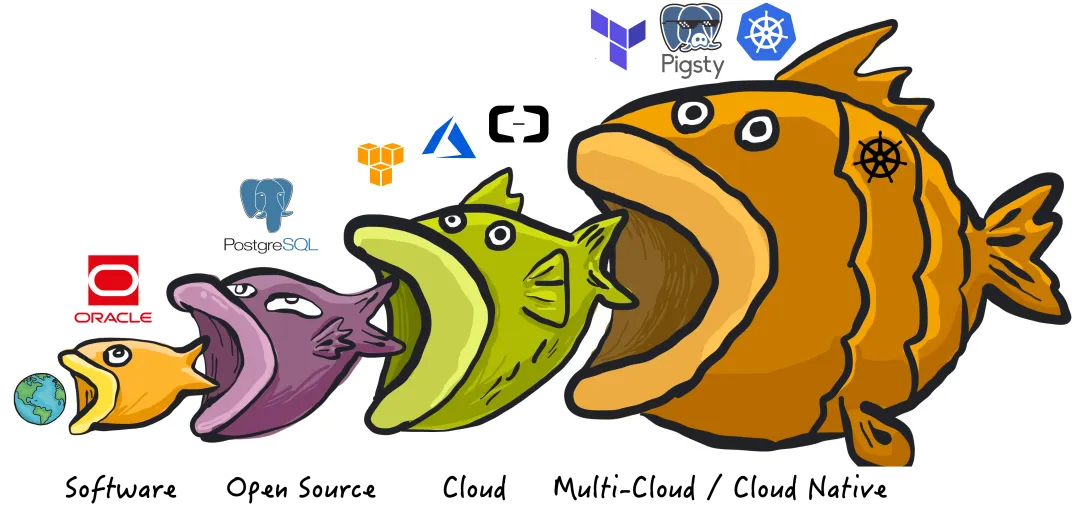
PIGSTY now stands for “PostgreSQL In Great STYle” — PostgreSQL at its best. Pigsty’s positioning has also evolved from “batteries-included PostgreSQL distribution” to “Me Better Open-Source RDS PG Alternative”.
No beating around the bush — this is an ambitious goal: overthrow cloud database monopolies and disrupt RDS!
2.0 New Features#
Pigsty is a better, local-first, open-source RDS for PostgreSQL alternative.
Powerful Distribution#
Unleash the full power of the world’s most advanced relational database!
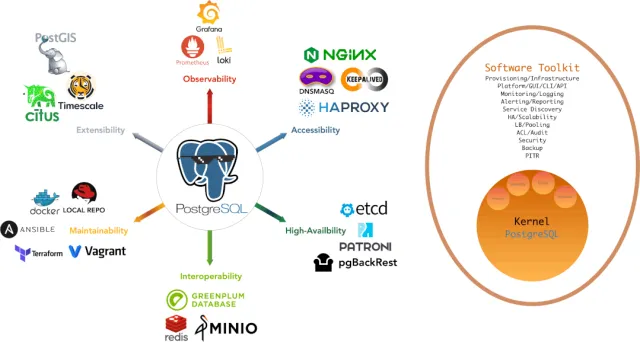
PostgreSQL is a near-perfect database kernel, but it needs more tools and systems to become a good enough database service (RDS) — Pigsty helps PostgreSQL make this leap.
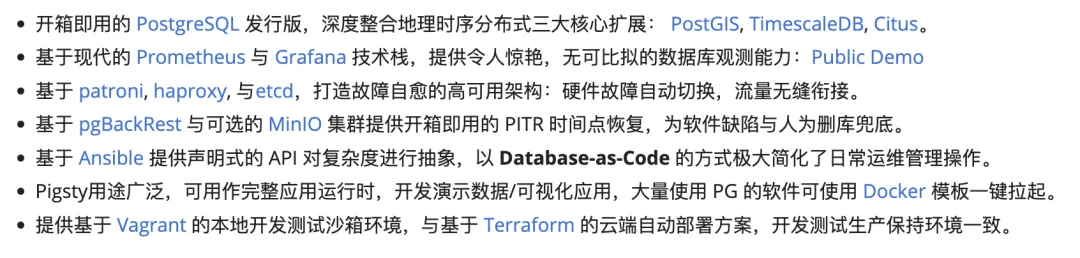
Pigsty deeply integrates PostgreSQL ecosystem’s three core extensions: PostGIS, TimescaleDB, and Citus, ensuring they work together to provide distributed geospatial time-series database capabilities. Pigsty also provides software needed to run enterprise-grade RDS services, packaging all dependencies into offline bundles. All components can be installed and deployed with one click without internet access, ready for production.
In Pigsty, functional components are abstracted into modules that can be freely combined for various scenarios. The INFRA module comes with a complete modern monitoring stack, while the NODE module tunes nodes to specified states and integrates them into monitoring. Installing the PGSQL module on multiple nodes automatically forms a high-availability database cluster based on primary-replica replication, and the ETCD module provides consensus and metadata storage for database HA. The optional MINIO module can serve as storage for large files like images and videos, or as a database backup repository. REDIS, which pairs excellently with PG, is also supported. More modules (like GPSQL, MYSQL, KAFKA) will be added later, and you can develop your own modules to extend Pigsty’s capabilities.
Stunning Observability#
Unparalleled monitoring best practices using modern open-source observability stack!
Pigsty provides monitoring best practices based on the open-source Grafana/Prometheus observability stack: Prometheus for metric collection, Grafana for visualization, Loki for log collection and querying, Alertmanager for alert notifications. PushGateway for batch job monitoring, Blackbox Exporter for service availability checks. The entire system is designed as a one-click, out-of-the-box INFRA module.
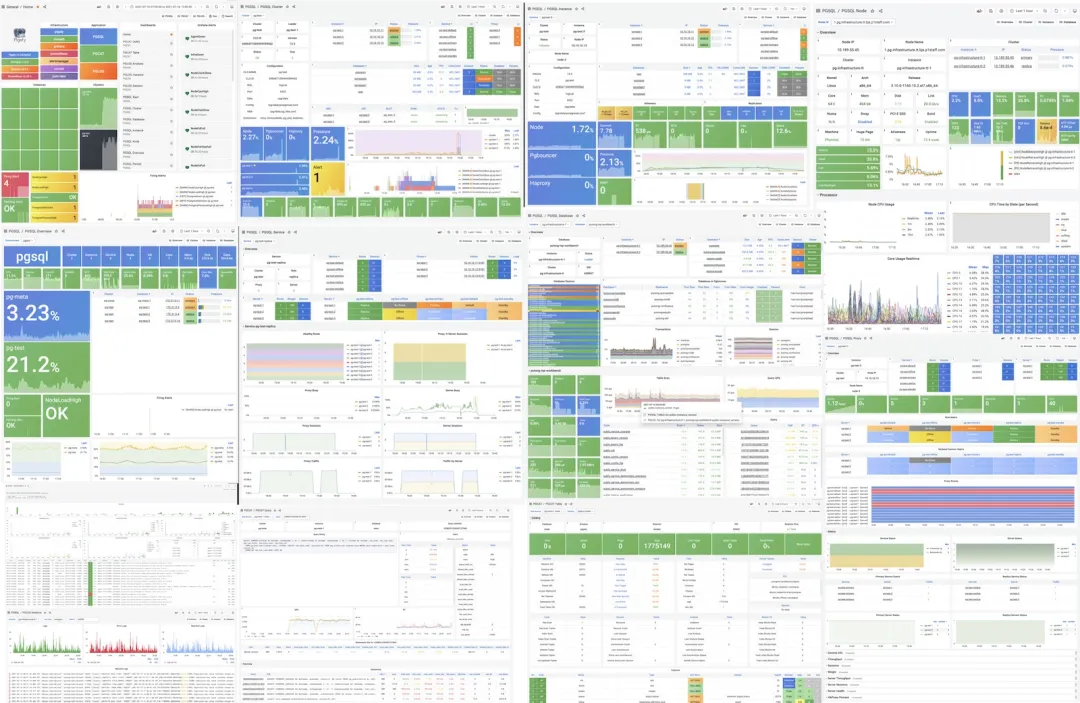
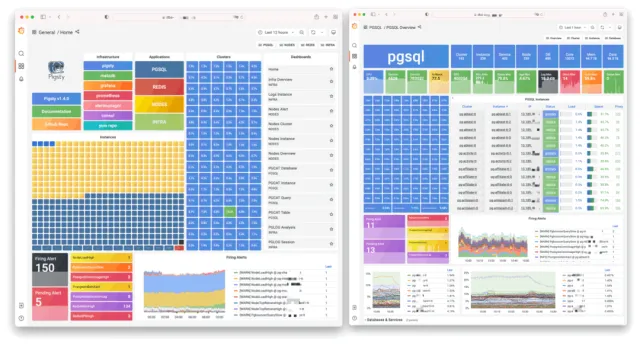
Any component managed by Pigsty is automatically integrated into monitoring, including host nodes, HAProxy load balancers, Postgres databases, Pgbouncer connection pools, ETCD metadata stores, Redis KV caches, MinIO object storage, and the entire monitoring infrastructure itself. Numerous Grafana dashboards and preset alert rules will qualitatively enhance your system observability. This system can also be reused for your application monitoring infrastructure, or to monitor existing database instances or RDS.
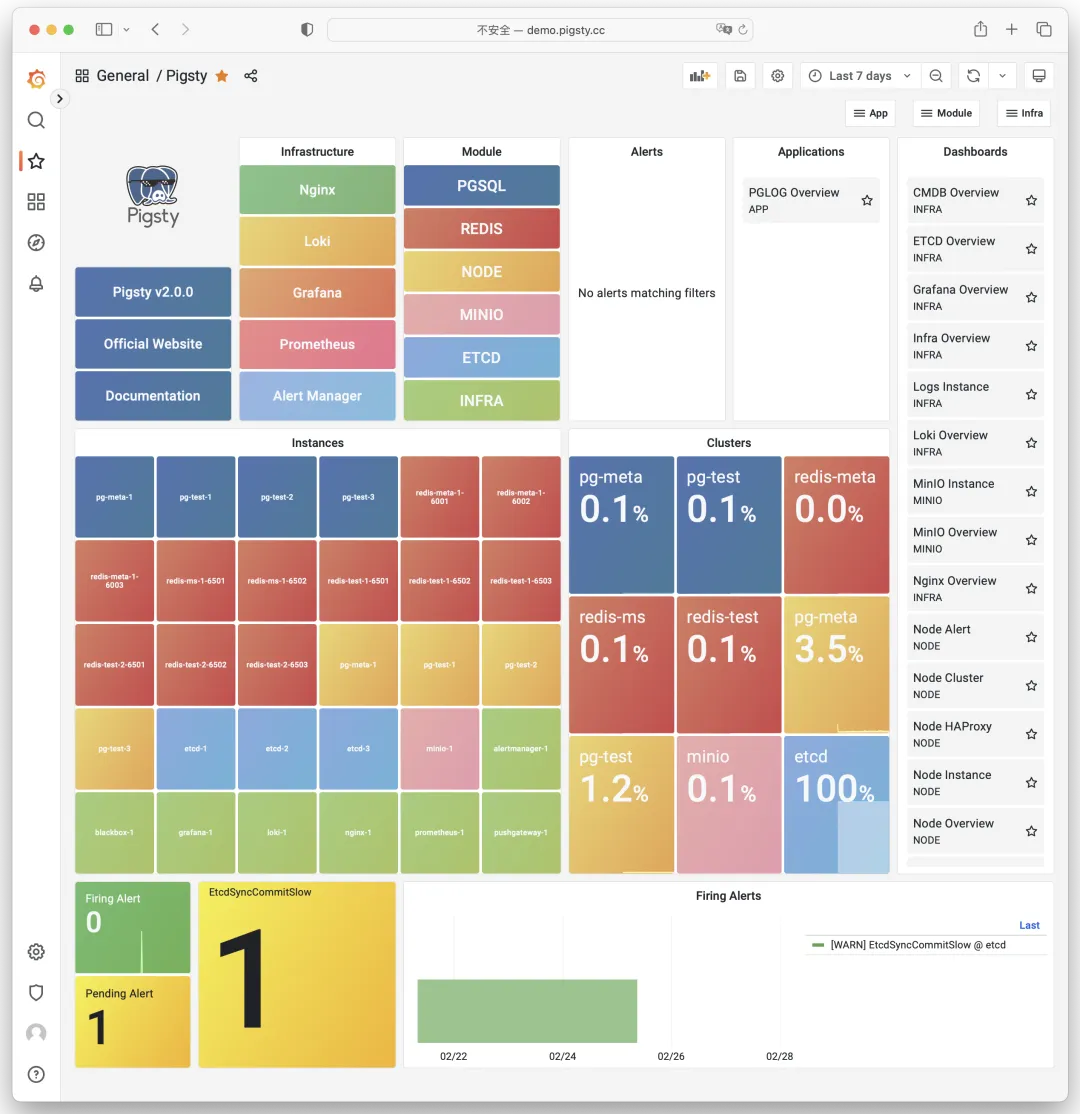
Whether for failure analysis or slow query optimization, capacity assessment or resource planning, Pigsty provides comprehensive data support for truly data-driven operations. In Pigsty, over three thousand metric types describe every aspect of the system, further processed, aggregated, analyzed, refined, and presented in intuitive visualizations. From global fleet overviews to CRUD details of individual objects (tables, indexes, functions) in a database instance — everything is visible. You can drill down, roll up, and navigate horizontally, browsing system current state and historical trends while predicting future evolution. See the public demo: http://demo.pigsty.cc.
Battle-Tested Reliability#
Out-of-the-box high availability and point-in-time recovery ensure your database is rock solid!
For table/database drops caused by software defects or human error, Pigsty provides out-of-the-box PITR point-in-time recovery, enabled by default without additional configuration. As long as storage is sufficient, base backups and WAL archiving powered by pgBackRest give you the ability to quickly return to any point in time. You can use local directories/disks, dedicated MinIO clusters, or S3 object storage for longer retention periods — your choice.
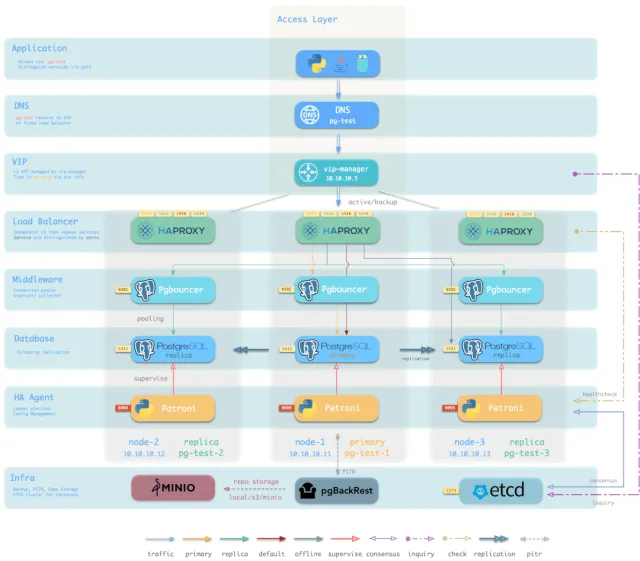
More importantly, Pigsty makes high availability and self-healing standard for PostgreSQL clusters. The self-healing architecture built on patroni, etcd, and haproxy handles hardware failures with ease: RTO < 30s for automatic primary failover, RPO = 0 in consistency-priority mode ensuring zero data loss. As long as any instance in the cluster survives, the cluster can provide full service, and clients connecting to any node in the cluster get complete service.
Pigsty includes HAProxy load balancer for automatic traffic switching, offering DNS/VIP/LVS and other access methods for clients. Failover and planned switchover are nearly imperceptible to applications except for brief blips — no need to modify connection strings and restart. Minimal maintenance windows bring great flexibility: you can perform rolling maintenance and upgrades without application coordination. Hardware failures can wait until the next day for leisurely handling — letting developers, ops, and DBAs sleep peacefully. Many large organizations and core institutions have been using Pigsty in production for extended periods. The largest deployment has 25K CPU cores and 200+ PostgreSQL instances. In this case, Pigsty experienced dozens of hardware failures and incidents over three years while maintaining 99.999%+ overall availability.
Simple and Maintainable#
Infra as Code — declarative APIs encapsulate database management complexity.
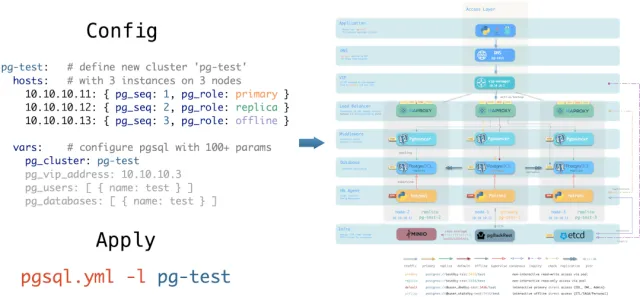
Pigsty uses declarative interfaces, elevating system controllability to a new level: users tell Pigsty “what kind of database cluster I want” via configuration inventory, without worrying about how to do it. In effect, this is similar to K8S CRDs and Operators, but Pigsty works on any node’s database and infrastructure — containers, VMs, or bare metal.
Whether creating/destroying clusters, adding/removing replicas, or provisioning databases/users/services/extensions/ACL rules, you just modify the configuration inventory and run Pigsty’s idempotent playbooks — Pigsty adjusts the system to your desired state. Users don’t worry about configuration details; Pigsty automatically tunes based on machine hardware. You only need to focus on basics like cluster name, which instances go on which machines, which template to use (transaction/analytics/critical/tiny) — developers can self-service. But if you want to dive deeper, Pigsty provides rich, fine-grained control parameters to satisfy the pickiest DBA’s customization needs.
Additionally, Pigsty installation itself is one-click simple, with all dependencies pre-packaged for offline installation without internet access. Machine resources for installation can be automatically provisioned via Vagrant or Terraform templates, letting you spin up a complete Pigsty deployment on your local laptop or cloud VMs in ten-ish minutes. The local sandbox can run on 1-core 2GB micro VMs, providing identical functionality to production for development, testing, demos, and learning.
Solid Security#
Encryption and backup all in one — as long as hardware and keys are secure, you don’t need to worry about database security.
Each Pigsty deployment creates a self-signed CA for certificate issuance. All network communication can use SSL encryption. Database passwords are encrypted with compliant scram-sha-256 algorithm, remote backups use AES-256 encryption. Additionally, an out-of-the-box access control system for PGSQL addresses security needs for most scenarios.
Pigsty provides an out-of-the-box, easy-to-use, refined and flexible, easily extensible access control system for PostgreSQL, including four default roles with separation of duties: read (DQL) / write (DML) / admin (DDL) / offline (ETL), and four default users: dbsu / replicator / monitor / admin. All database templates have sensible default permissions for these roles and users, and any new database objects automatically follow this permission system. Client access is restricted by HBA rule groups designed on the principle of least privilege, with all sensitive operations logged for audit.
All network communication can use SSL encryption. Sensitive management pages and API endpoints are protected by multiple layers: username/password authentication, access restricted to management node/infrastructure node IPs/subnets, HTTPS required for network traffic. Patroni API and Pgbouncer have SSL disabled by default for performance reasons, but security switches are available when needed. Properly configured systems pass security certifications easily. With internal network deployment, properly configured security groups and firewalls, database security will no longer be your pain point.
Broad Application Scenarios#
One-click launch massive software using PostgreSQL with preset Docker templates!
In data-intensive applications, databases are often the trickiest part. For example, the core difference between GitLab Enterprise and Community editions is the underlying PostgreSQL database monitoring and HA. If you already have a good enough local PG RDS, why pay for software’s homegrown database?
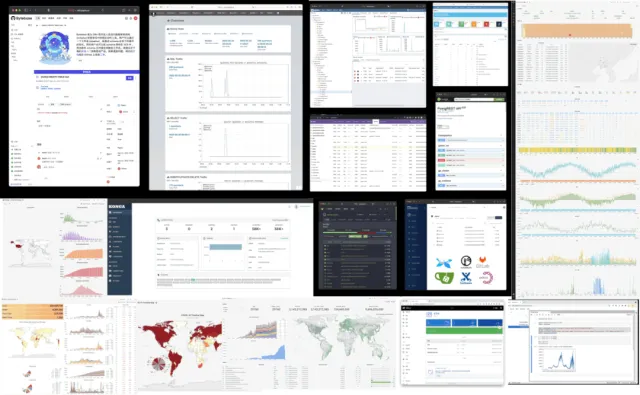
Pigsty provides the Docker module with many out-of-the-box Compose templates. You can use Pigsty-managed HA PostgreSQL (plus Redis and MinIO) as backend storage, launching these applications statelessly with one click: Gitlab, Gitea, Wiki.js, Odoo, Jira, Confluence, Habour, Mastodon, Discourse, KeyCloak, etc. If your application needs a reliable PostgreSQL database, Pigsty might be the simplest way to get one.
Pigsty also provides development toolkits tightly integrated with PostgreSQL: PGAdmin4, PGWeb, ByteBase, PostgREST, Kong, plus “upper-layer databases” using PostgreSQL as storage like EdgeDB, FerretDB, and Supabase. Even better, you can build interactive data applications using Pigsty’s built-in Grafana and Postgres in a low-code way, and even create more expressive interactive visualizations with Pigsty’s built-in ECharts panel.
Open-Source Free Software#
Pigsty is free software under AGPLv3, nurtured by community members who love PostgreSQL
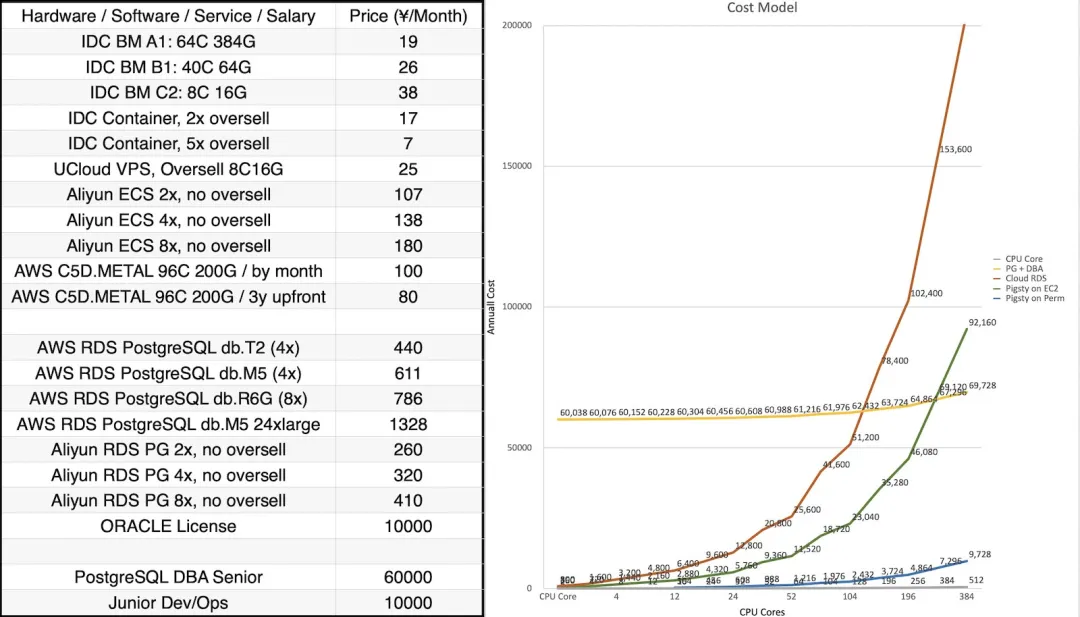
Pigsty is completely open-source and free, allowing you to run enterprise-grade PostgreSQL database services at nearly bare-metal hardware costs without database experts. By comparison, public cloud vendors charge premiums of several to over ten times the underlying hardware resources as “service fees” for RDS.
Many users choose cloud because they can’t handle databases themselves; many use RDS because there’s no alternative. We will break cloud vendor monopolies, providing users with a cloud-neutral, better open-source RDS alternative: Pigsty closely follows the PostgreSQL upstream trunk, with no vendor lock-in, no annoying “license fees”, no node limits, and no data collection. All your core assets — data — remain “autonomous and controllable” in your own hands.
Pigsty aims to replace tedious manual database ops with database autopilot software, but no software can solve every problem. There will always be some rare edge cases requiring expert intervention. This is why we offer professional subscription services for enterprise users needing PostgreSQL support. A few thousand dollars in subscription/consulting fees is a tiny fraction of a top DBA’s annual salary, giving you complete peace of mind and putting costs where they matter. For community users, we also provide free support and daily Q&A.
2.0 Quick Start#
Pigsty 2.0 installation is still one command:
curl -fsSL http://download.pigsty.cc/get | bash
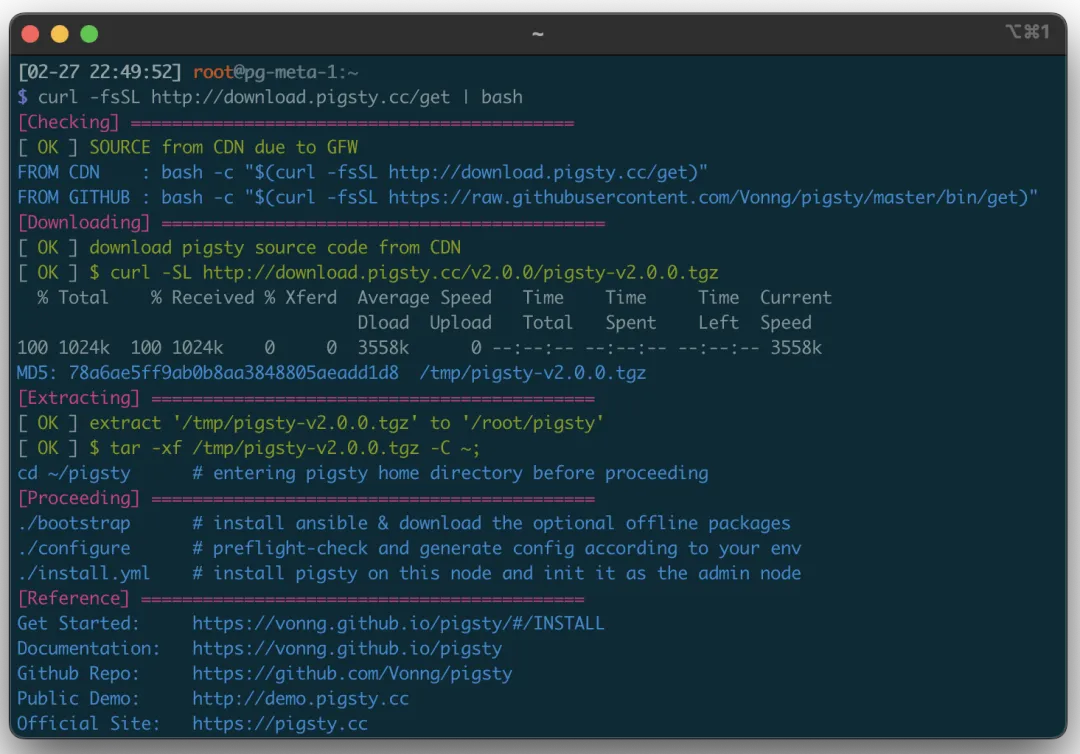
For limited internet access, you can download the offline package for your OS from GitHub or CDN in advance. The monitoring system has a public demo: http://demo.pigsty.cc.
v2.0.0 Release Notes#
Highlights#
- Perfect integration of PostgreSQL 15, PostGIS 3.3, Citus 11.2, TimescaleDB 2.10 — distributed geospatial time-series hyper-converged database
- Major OS compatibility improvements: supports EL7, 8, 9, plus RHEL, CentOS, Rocky, OracleLinux, AlmaLinux compatible distros
- Security improvements: self-signed CA, global SSL network encryption, scram-sha-256 password auth, AES-encrypted backups, redesigned HBA rule system
- Patroni upgraded to 3.0, providing native HA Citus distributed cluster support, FailSafe mode enabled by default — no fear of DCS failures causing global primary outages
- Out-of-the-box PITR support based on pgBackRest, default support for local filesystem and dedicated MinIO/S3 cluster backups
- New
ETCDmodule: independently deployable, easy scaling, built-in monitoring and HA, completely replacing Consul as DCS for HA PG - New
MINIOmodule: independently deployable, multi-disk multi-node support, S3 local replacement, also for centralized PostgreSQL backup repository - Significantly simplified configuration parameters, usable without defaults; templates auto-adjust host and PG parameters based on machine specs, HBA/service definitions more concise and universal
- License changed from Apache License 2.0 to AGPL 3.0 due to Grafana and MinIO dependencies
Compatibility#
- Supports EL7, EL8, EL9 major versions with corresponding offline packages, default dev/test environment upgraded from EL7 to EL9
- Supports more EL-compatible Linux distros: RHEL, CentOS, RockyLinux, AlmaLinux, OracleLinux, etc.
- Source and offline package naming conventions changed — version, OS version, and architecture now reflected in package names
PGSQL: PostgreSQL 15.2, PostGIS 3.3, Citus 11.2, TimescaleDB 2.10 now work together harmoniouslyPGSQL: Patroni upgraded to 3.0 as PGSQL HA component- ETCD now default DCS, replacing Consul, eliminating one Consul Agent failure point
- vip-manager upgraded to 2.1 using ETCDv3 API, completely deprecating ETCDv2 API; same for Patroni
- Native HA Citus distributed cluster support using fully open-source Citus 11.2
- FailSafe mode enabled by default — no fear of DCS failures causing global primary outages
PGSQL: pgBackrest v2.44 introduced for out-of-the-box PostgreSQL PITR- Default backup repo on primary’s backup directory, rolling two-day recovery window
- Default alternative repo is dedicated MinIO/S3 cluster, rolling two-week recovery window; local use requires enabling MinIO module
ETCDnow an independently deployed module with complete scale-out/in solution and monitoringMINIOnow an independently deployed module, multi-disk multi-node support, S3 local replacement, also for centralized backup repositoryNODEmodule now includeshaproxy,docker,node_exporter,promtailcomponentschronydnow replacesntpdas default NTP service on all nodes- HAPROXY now part of
NODErather thanPGSQL-exclusive, can expose services via NodePort PGSQLmodule can now use dedicated centralized HAPROXY cluster for unified external service
INFRAmodule now includesdnsmasq,nginx,prometheus,grafana,lokicomponents- DNSMASQ server in Infra module enabled by default, added as default DNS server for all nodes
- Added
blackbox_exporterfor host PING probing,pushgatewayfor batch job metrics lokiandpromtailnow use Grafana’s default packages with official Grafana Echarts panel plugin- Monitoring support for PostgreSQL 15’s new observability points, added Patroni monitoring
- Software version upgrades
- PostgreSQL 15.2 / PostGIS 3.3 / TimescaleDB 2.10 / Citus 11.2
- Patroni 3.0 / Pgbouncer 1.18 / pgBackRest 2.44 / vip-manager 2.1
- HAProxy 2.7 / Etcd 3.5 / MinIO 20230131022419 / mcli 20230128202938
- Prometheus 2.42 / Grafana 9.3 / Loki & Promtail 2.7 / Node Exporter 1.5
Security#
- Complete local self-signed CA:
pigsty-cafor issuing internal component certificates - User creation/password changes no longer leave traces in log files
- Nginx enables SSL support by default (for HTTPS, trust
pigsty-cain your system or use Chromethisisunsafe) - ETCD fully enables SSL encryption for client and peer communication
- PostgreSQL SSL support added and enabled by default, management connections use SSL
- Pgbouncer SSL support added, disabled by default for performance
- Patroni SSL support added, management API restricted to local and admin node access with password auth
- PostgreSQL default password auth changed from
md5toscram-sha-256 - Pgbouncer auth query support added for dynamic connection pool user management
- pgBackRest uses
AES-256-CBCencryption by default for remote centralized backup storage - High-security template provided: enforces global SSL and requires admin certificate login
- All default HBA rules now explicitly defined in config files
Maintainability#
- Existing config templates auto-adjust optimizations based on machine specs (CPU/memory/storage)
- Postgres/Pgbouncer/Patroni/pgBackRest log directories now dynamically configurable: default
/pg/log/<type>/ - Original IP placeholder
10.10.10.10replaced with dedicated variable${admin_ip}, referenceable in multiple places for switching backup admin nodes regioncan be specified to use upstream mirrors from different regions for faster package downloads- Finer-grained upstream source addresses now allowed based on EL version, architecture, and region
- Terraform templates for Alibaba Cloud and AWS China provided for one-click EC2 VM provisioning
- Multiple Vagrant sandbox templates provided:
meta,full,el7/8/9,minio,build,citus - New dedicated playbook:
pgsql-monitor.ymlfor monitoring existing Postgres instances or RDS - New dedicated playbook:
pgsql-migration.ymlfor seamless logical replication migration to Pigsty-managed clusters - Series of dedicated shell utilities added, wrapping common ops operations
- All Ansible roles optimized for simplicity, readability, and maintainability — usable without default parameters
- Additional Pgbouncer parameters can be defined at business database/user level
API Changes#
Pigsty v2.0 has extensive changes: 64 new parameters, 13 removed, 17 renamed.
New Parameters
INFRA.META.admin_ip: Primary meta node IP addressINFRA.META.region: Upstream mirror region: default|china|europeINFRA.META.os_version: Enterprise Linux version: 7,8,9INFRA.CA.ca_cn: CA Common Name, default pigsty-caINFRA.CA.cert_validity: Certificate validity, default 20 yearsINFRA.REPO.repo_enabled: Build local yum repo on infra node?INFRA.REPO.repo_upstream: Upstream yum repo definition listINFRA.REPO.repo_home: Local yum repo home directory, usually same as nginx_home ‘/www’INFRA.NGINX.nginx_ssl_port: HTTPS listen portINFRA.NGINX.nginx_ssl_enabled: Enable nginx HTTPS?INFRA.PROMETHEUS.alertmanager_endpoint: Alertmanager endpoint (ip|domain):port formatNODE.NODE_TUNE.node_hugepage_ratio: Memory hugepage ratio, default 0 (disabled)NODE.HAPROXY.haproxy_service: List of haproxy services to exposePGSQL.PG_ID.pg_mode: pgsql cluster mode: pgsql,citus,gpsqlPGSQL.PG_BUSINESS.pg_dbsu_password: dbsu password, empty string means no dbsu passwordPGSQL.PG_INSTALL.pg_log_dir: postgres log directory, default/pg/data/logPGSQL.PG_BOOTSTRAP.pg_storage_type: SSD|HDD, default SSDPGSQL.PG_BOOTSTRAP.patroni_log_dir: patroni log directory, default/pg/logPGSQL.PG_BOOTSTRAP.patroni_ssl_enabled: Use SSL for patroni RestAPI?PGSQL.PG_BOOTSTRAP.patroni_username: patroni rest api usernamePGSQL.PG_BOOTSTRAP.patroni_password: patroni rest api password (important: change this)PGSQL.PG_BOOTSTRAP.patroni_citus_db: Citus database managed by patroni, default postgresPGSQL.PG_BOOTSTRAP.pg_max_conn: postgres max connections,autouses recommended valuePGSQL.PG_BOOTSTRAP.pg_shmem_ratio: postgres shared memory ratio, default 0.25, range 0.1~0.4PGSQL.PG_BOOTSTRAP.pg_rto: Recovery Time Objective, failover ttl, default 30sPGSQL.PG_BOOTSTRAP.pg_rpo: Recovery Point Objective, max 1MB data loss by defaultPGSQL.PG_BOOTSTRAP.pg_pwd_enc: Password encryption algorithm: md5|scram-sha-256PGSQL.PG_BOOTSTRAP.pgbouncer_log_dir: pgbouncer log directory, default/var/log/pgbouncerPGSQL.PG_BOOTSTRAP.pgbouncer_auth_query: If enabled, query pg_authid for biz users instead of populating user listPGSQL.PG_BOOTSTRAP.pgbouncer_sslmode: pgbouncer client SSL: disable|allow|prefer|require|verify-ca|verify-fullPGSQL.PG_BOOTSTRAP.pg_service_provider: Dedicated haproxy node group name, or empty for local nodePGSQL.PG_BOOTSTRAP.pg_default_service_dest: Default service destination if svc.dest=‘default’PGSQL.PG_BACKUP.pgbackrest_enabled: Enable pgbackrest?PGSQL.PG_BACKUP.pgbackrest_clean: Remove pgbackrest data during init?PGSQL.PG_BACKUP.pgbackrest_log_dir: pgbackrest log directory, default/pg/logPGSQL.PG_BACKUP.pgbackrest_method: pgbackrest backup repo method: local or minioPGSQL.PG_BACKUP.pgbackrest_repo: pgbackrest backup repo configPGSQL.PG_DNS.pg_dns_suffix: pgsql dns suffix, default emptyPGSQL.PG_DNS.pg_dns_target: auto, primary, vip, none, or ad hoc ipETCD.etcd_seq: etcd instance identifier, requiredETCD.etcd_cluster: etcd cluster and group name, default etcdETCD.etcd_safeguard: Prevent purging running etcd instances?ETCD.etcd_clean: Clean existing etcd during init?ETCD.etcd_data: etcd data directory, default /data/etcdETCD.etcd_port: etcd client port, default 2379ETCD.etcd_peer_port: etcd peer port, default 2380ETCD.etcd_init: etcd initial cluster state: new or existingETCD.etcd_election_timeout: etcd election timeout, default 1000msETCD.etcd_heartbeat_interval: etcd heartbeat interval, default 100msMINIO.minio_seq: minio instance identifier, requiredMINIO.minio_cluster: minio cluster name, default minioMINIO.minio_clean: Clean minio during init? default falseMINIO.minio_user: minio OS user, defaultminioMINIO.minio_node: minio node name patternMINIO.minio_data: minio data directory, use {x…y} for multiple drivesMINIO.minio_domain: minio external domain, defaultsss.pigstyMINIO.minio_port: minio service port, default 9000MINIO.minio_admin_port: minio console port, default 9001MINIO.minio_access_key: root access key, defaultminioadminMINIO.minio_secret_key: root secret key, defaultminioadminMINIO.minio_extra_vars: extra environment variables for minio serverMINIO.minio_alias: alias for local minio deploymentMINIO.minio_buckets: list of minio buckets to createMINIO.minio_users: list of minio users to create
Removed Parameters
INFRA.CA.ca_homedir: CA home directory, now fixed to/etc/pki/INFRA.CA.ca_cert: CA certificate filename, now fixed toca.keyINFRA.CA.ca_key: CA key filename, now fixed toca.keyINFRA.REPO.repo_upstreams: Replaced byrepo_upstreamPGSQL.PG_INSTALL.pgdg_repo: Now handled by node playbooksPGSQL.PG_INSTALL.pg_add_repo: Now handled by node playbooksPGSQL.PG_IDENTITY.pg_backup: Unused and conflicted with partial namesPGSQL.PG_IDENTITY.pg_preflight_skip: No longer used, replaced bypg_idDCS.dcs_name: Removed due to etcd usageDCS.dcs_servers: Replaced by ad hoc groupetcdDCS.dcs_registry: Removed due to etcd usageDCS.dcs_safeguard: Replaced byetcd_safeguardDCS.dcs_clean: Replaced byetcd_clean
Renamed Parameters
nginx_upstream->infra_portalrepo_address->repo_endpointpg_hostname->node_id_from_pgpg_sindex->pg_grouppg_services->pg_default_servicespg_services_extra->pg_servicespg_hba_rules_extra->pg_hba_rulespg_hba_rules->pg_default_hba_rulespgbouncer_hba_rules_extra->pgb_hba_rulespgbouncer_hba_rules->pgb_default_hba_rulesvip_mode->pg_vip_enabledvip_address->pg_vip_addressvip_interface->pg_vip_interfacenode_packages_default->node_default_packagesnode_packages_meta->infra_packagesnode_packages_meta_pip->infra_packages_pipnode_data_dir->node_data
Special thanks to Italian user @alemacci for contributions on SSL encryption, backup, multi-OS distro adaptation, and adaptive parameter templates!
v2.0.1 Release Notes#
Security improvements and bug fixes for v2.0.0.
Improvements
- New pig logo to comply with PostgreSQL trademark policy
- Grafana upgraded to v9.4 with better UI and bug fixes
- Patroni upgraded to v3.0.1 with bug fixes
- Grafana systemd service file reverted to rpm default
- Use slower
copyinstead ofrsyncfor Grafana dashboard sync, more reliable - Bootstrap now restores default repo files after execution
- Added asciinema videos for various admin tasks
- Security enhancement mode: restricted monitoring user permissions
- New config template:
dual.ymlfor two-node deployment - Enable
log_connectionsandlog_disconnectionsincrit.ymltemplate - Enable
$lib/passwordcheckinpg_libsincrit.ymltemplate - Explicitly grant
pg_monitorrole monitoring view permissions - Remove default
dbrole_readonlyfromdbuser_monitorto restrict monitoring user permissions - Patroni now listens on
{{ inventory_hostname }}instead of0.0.0.0 pg_listennow controls postgres/pgbouncer listen address${ip},${lo},${vip}placeholders now available inpg_listen- Aliyun terraform image upgraded from centos 7.9 to Rocky Linux 9
- Bytebase upgraded to v1.14.0
Bug Fixes
- Added missing advertise address for alertmanager
- Fixed missing
pg_modevariable when creating database users withbin/pgsql-user - Added
-a passwordoption for Redis cluster join task inredis.yml - Added missing default value in
infra-rm.yml.remove infra datatask - Fixed prometheus monitoring target definition file owner to
prometheususer - Use admin user instead of root to delete DCS metadata
- Fixed issue caused by Grafana 9.4 bug: missing Meta datasource
v2.0.2 Release Notes#
Highlights
Use out-of-the-box pgvector to store AI Embeddings, index, and retrieve vectors.
- New extension
pgvector - MinIO CVE-2023-28432 fix
Changes
- New extension
pgvectorfor storing AI embeddings and vector similarity search - Fixed MinIO CVE-2023-28432, using new policy API from 20230324
- Added dynamic reload command for DNSMASQ systemd service
- Updated PEV version to v1.8
- Updated Grafana version to v9.4.7
- Updated MinIO and MCLI versions to 20230324
- Updated Bytebase version to v1.15.0
- Updated monitoring dashboards and fixed dead links
- Updated Aliyun Terraform template, default to RockyLinux 9
- Using Grafana v9.4 Provisioning API
- Added asciinema videos for many admin tasks
- Fixed EL8 PostgreSQL broken dependencies: removed anonymizer_15 faker_15 pgloader
MD5 (pigsty-pkg-v2.0.2.el7.x86_64.tgz) = d46440a115d741386d29d6de646acfe2
MD5 (pigsty-pkg-v2.0.2.el8.x86_64.tgz) = 5fa268b5545ac96b40c444210157e1e1
MD5 (pigsty-pkg-v2.0.2.el9.x86_64.tgz) = c8b113d57c769ee86a22579fc98e8345