



Pigsty v1.5 is officially released! Complete Docker support brings a rich application ecosystem — countless database-backed software works out of the box!
Other improvements include: infrastructure self-monitoring, better cold backup support, new CMDB compatible with Redis and Greenplum, ETCD as high-availability DCS, and better log collection and visualization. GitHub Stars crossed 500!
Highlights#
| Feature | Description |
|---|---|
| Docker Support | Enabled by default on meta node, with rich out-of-the-box software templates |
| Infra Self-Monitoring | Nginx, ETCD, Consul, Prometheus, Grafana, Loki |
| CMDB Upgrade | Supports Redis/Greenplum cluster metadata, configuration visualization |
| Service Discovery | Consul auto-discovers monitoring targets for Prometheus |
| Cold Backup Enhancement | Default scheduled backups, pg_probackup, one-click delayed replica |
| ETCD as DCS | Alternative to Consul for PostgreSQL/Patroni |
| Redis Improvements | Supports single-instance level init and remove operations |
Docker Support#
The most important feature in Pigsty v1.5 is Docker support. Countless software and tools can work out of the box via Docker: out-of-the-box database + out-of-the-box applications = out-of-the-box software solutions.
Many software products need databases, but putting databases in containers remains controversial. There’s a huge gap between Docker-based toy databases and production-grade databases. Pigsty combines the best of both: stateful databases are managed by Pigsty, running on standard physical or virtual machines (like PostgreSQL and Redis); stateless applications run via Docker, with their state stored in Pigsty-managed external databases.
In Pigsty v1.4.1, Docker was added as an experimental feature; in v1.5, Docker becomes a default Pigsty component, enabled by default on the meta node. Regular nodes have it disabled by default, but you can enable Docker on all nodes via configuration.
Application Ecosystem#
Docker itself is just a tool — what matters is the massive application ecosystem Docker represents!
Pigsty curated some commonly used software, especially those using PostgreSQL and Redis, providing one-click launch tutorials and shortcuts, plus an offline-ready Docker image package docker.tgz.
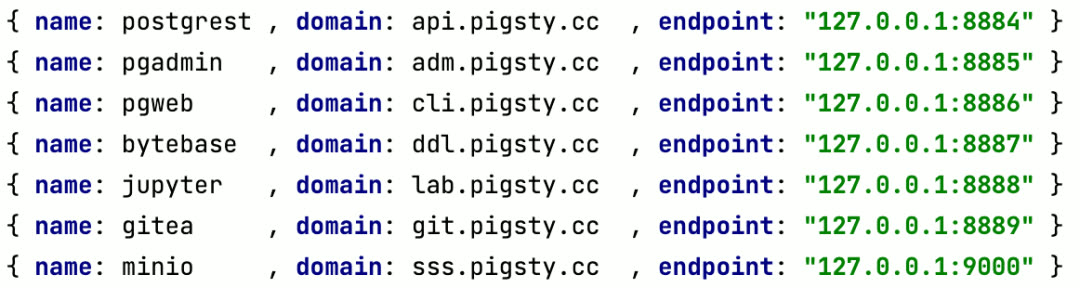
Code Hosting Platform: Gitea#
To start a private code hosting service, use this command to launch Gitea:
cd ~/pigsty/app/gitea; make up
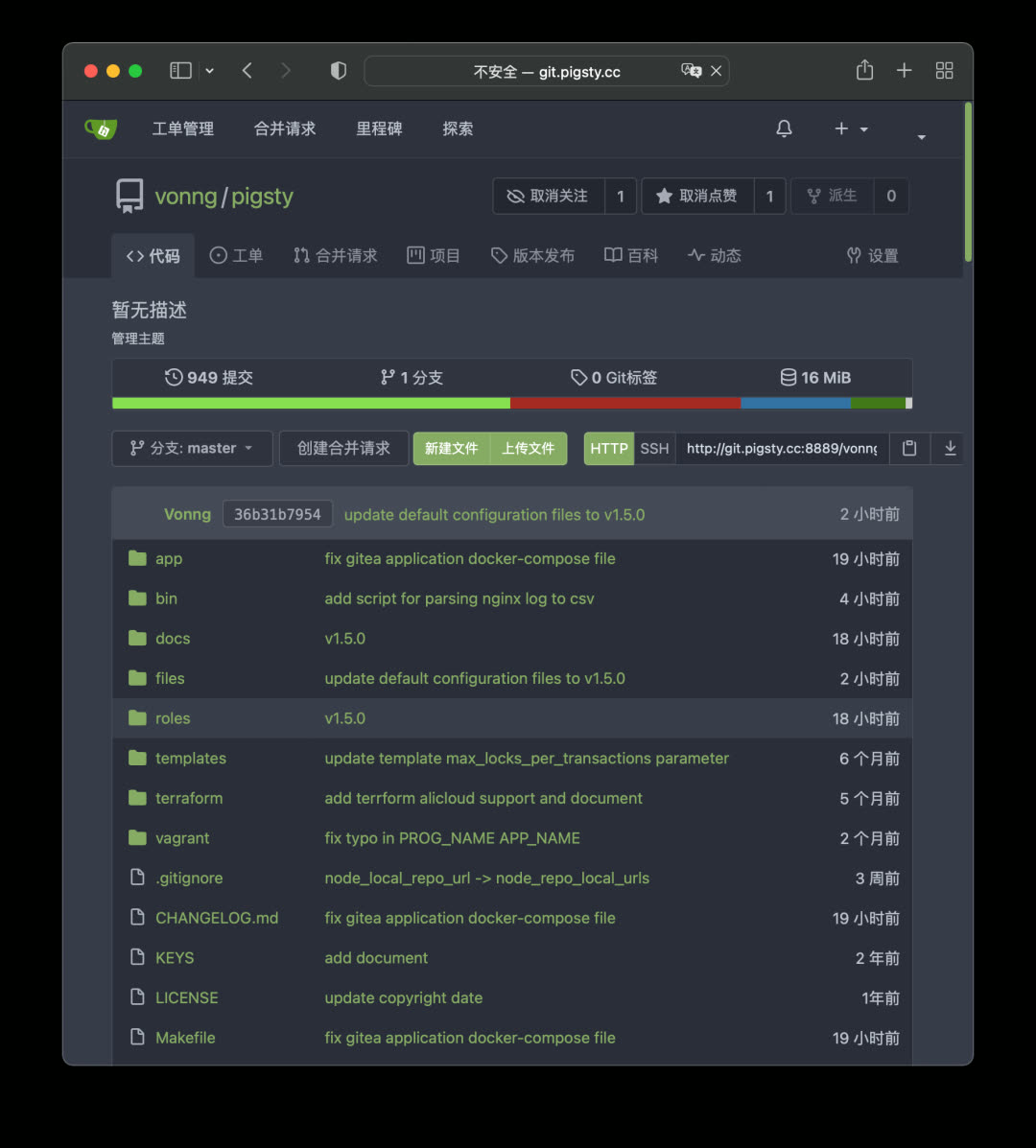
This command uses Docker Compose to launch the Gitea image, using Pigsty’s default CMDB pg-meta.gitea as metadata storage. Access the domain or port specified in the config file to access your code hosting service.
Database Management Platform: PgAdmin#
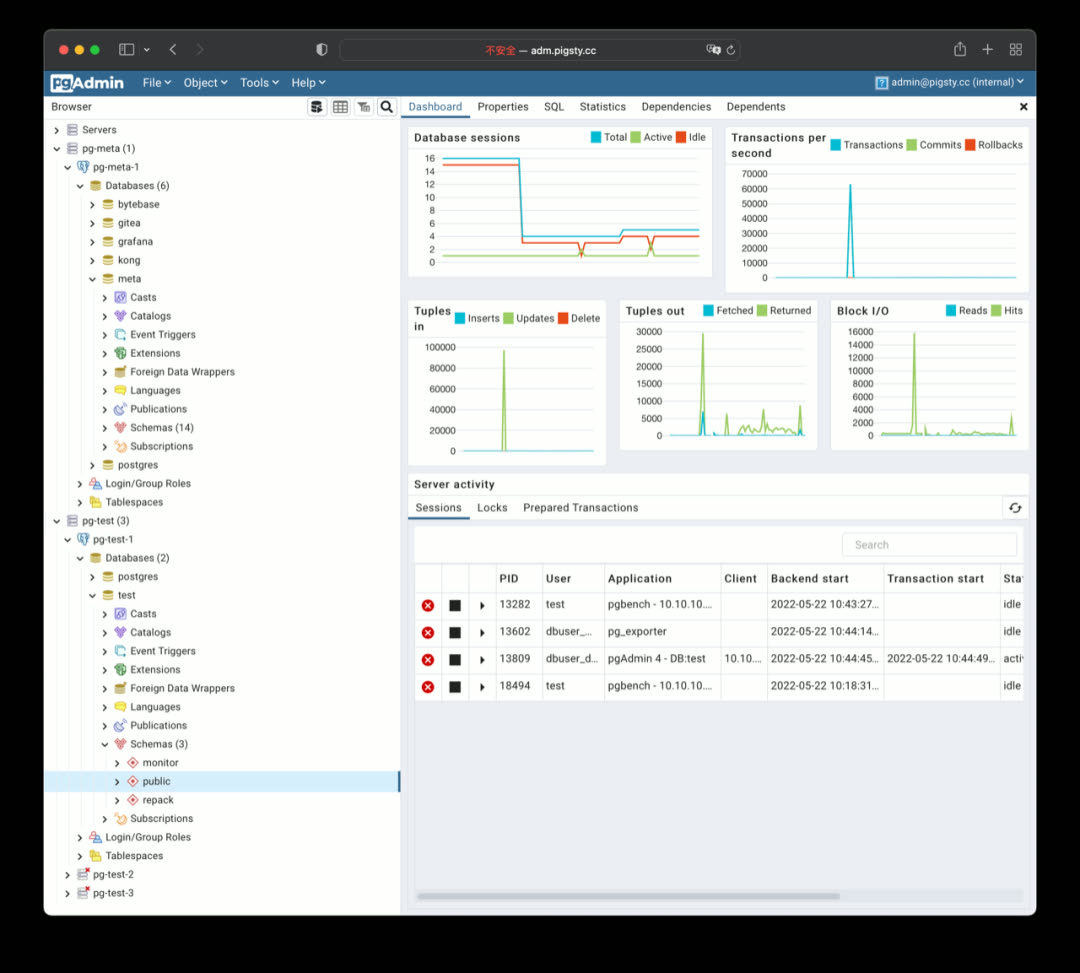
PgAdmin4 is a classic PostgreSQL management tool with many useful features. Pigsty provides the latest PgAdmin4 6.9 support — just one command to start the image, automatically loading all managed database instances from Pigsty.
cd ~/pigsty/app/pgadmin; make up; make conf
Schema Change Tool: Bytebase#
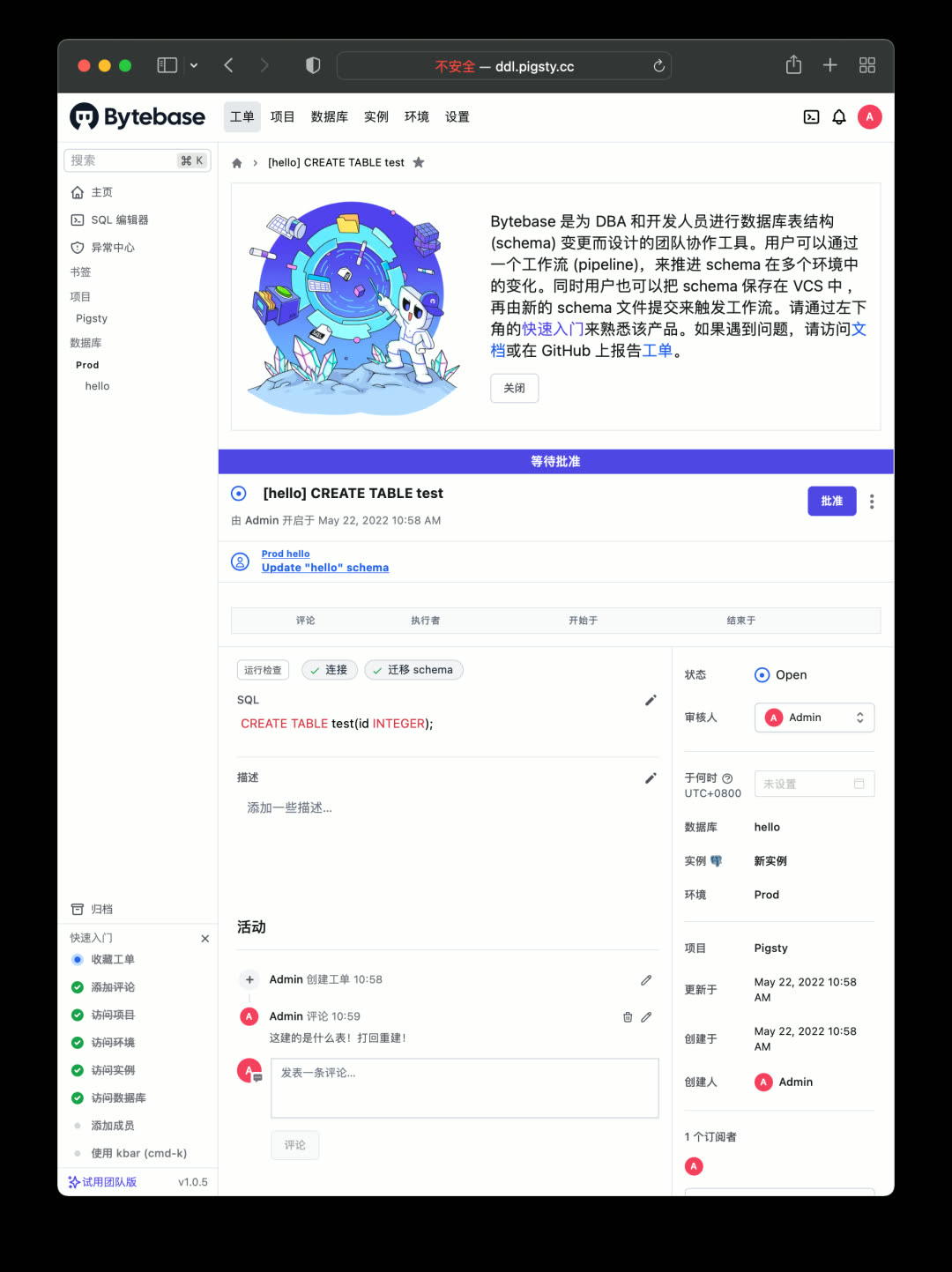
Bytebase is a schema change management tool designed for PostgreSQL, using Git workflows and ticket approval to version-control database schemas. Bytebase itself stores metadata in PostgreSQL.
cd ~/pigsty/app/bytebase; make up
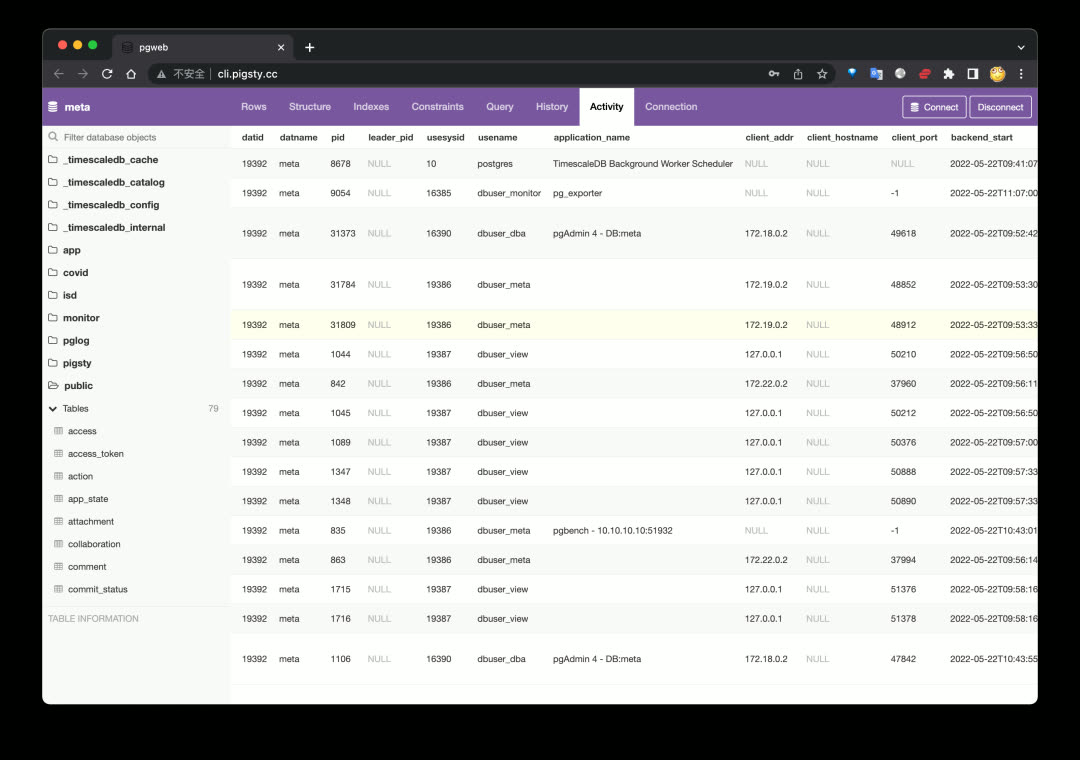
Web Client: PGWEB#
Sometimes users want to query small amounts of data from production databases using personal accounts — a browser-based PostgreSQL client works great. PGWEB can be deployed on the management node or a dedicated bastion host, with specific HBA rules allowing personal users to query production read-only instances.
cd ~/pigsty/app/pgweb; make up
Object Storage: MinIO#
Object storage is a fundamental cloud service. For private deployments, you can use MinIO to quickly build your own object storage. It can store documents, images, videos, backups, with automatic redundancy and disaster recovery, exposing a standard S3-compatible API.
cd ~/pigsty/app/minio; make up
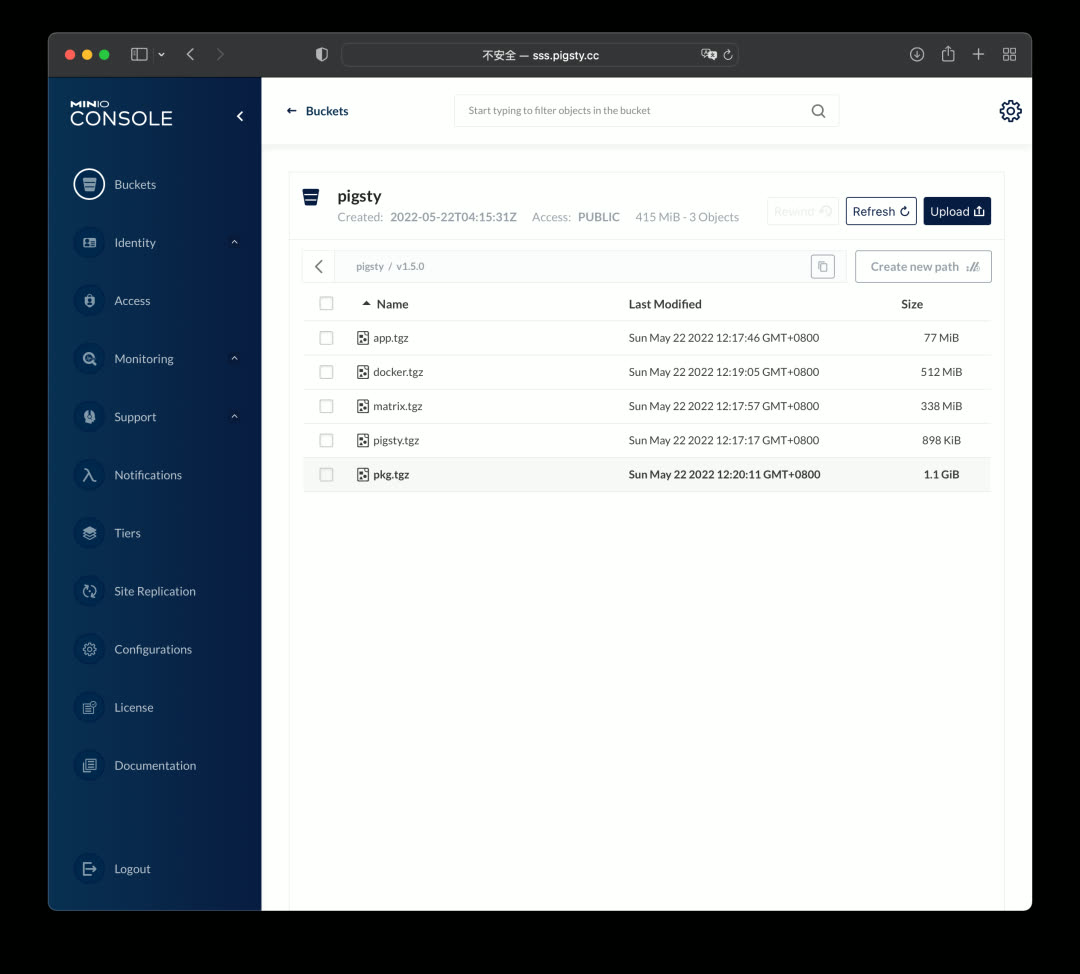
Building on MinIO, you can use JuiceFS to convert massive distributed storage into a filesystem for other services.
Data Analysis Environment: Jupyter#
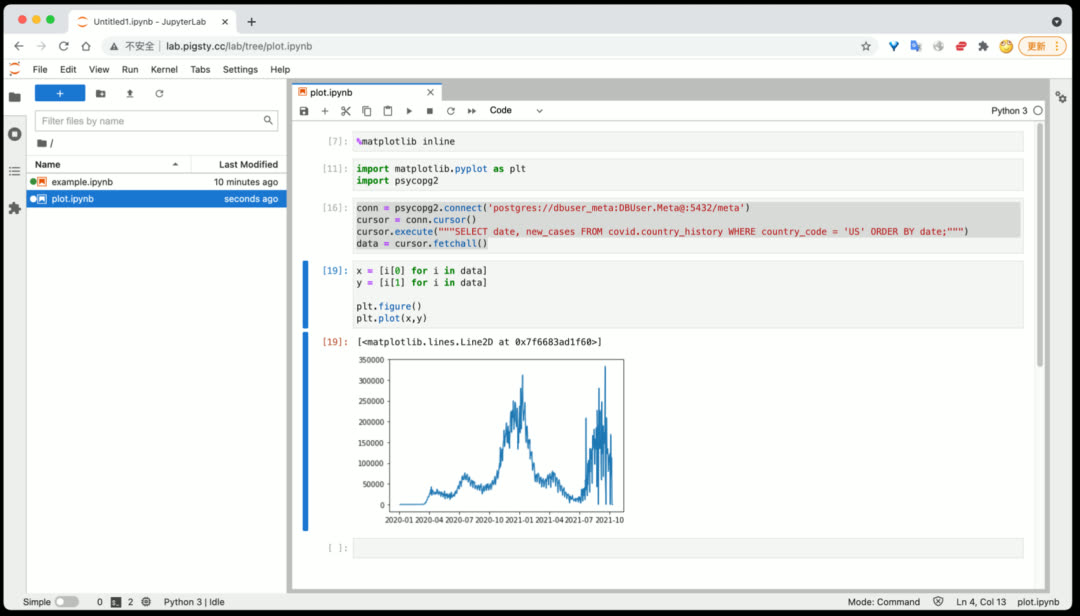
Pigsty provides a powerful data analysis tool: Jupyter Lab, allowing combined Python and SQL data processing and analysis. Jupyter Lab doesn’t run via Docker by default — it runs directly under a restricted OS user on the management node for easier database interaction.
Database Schema Reports: SchemaSPY#
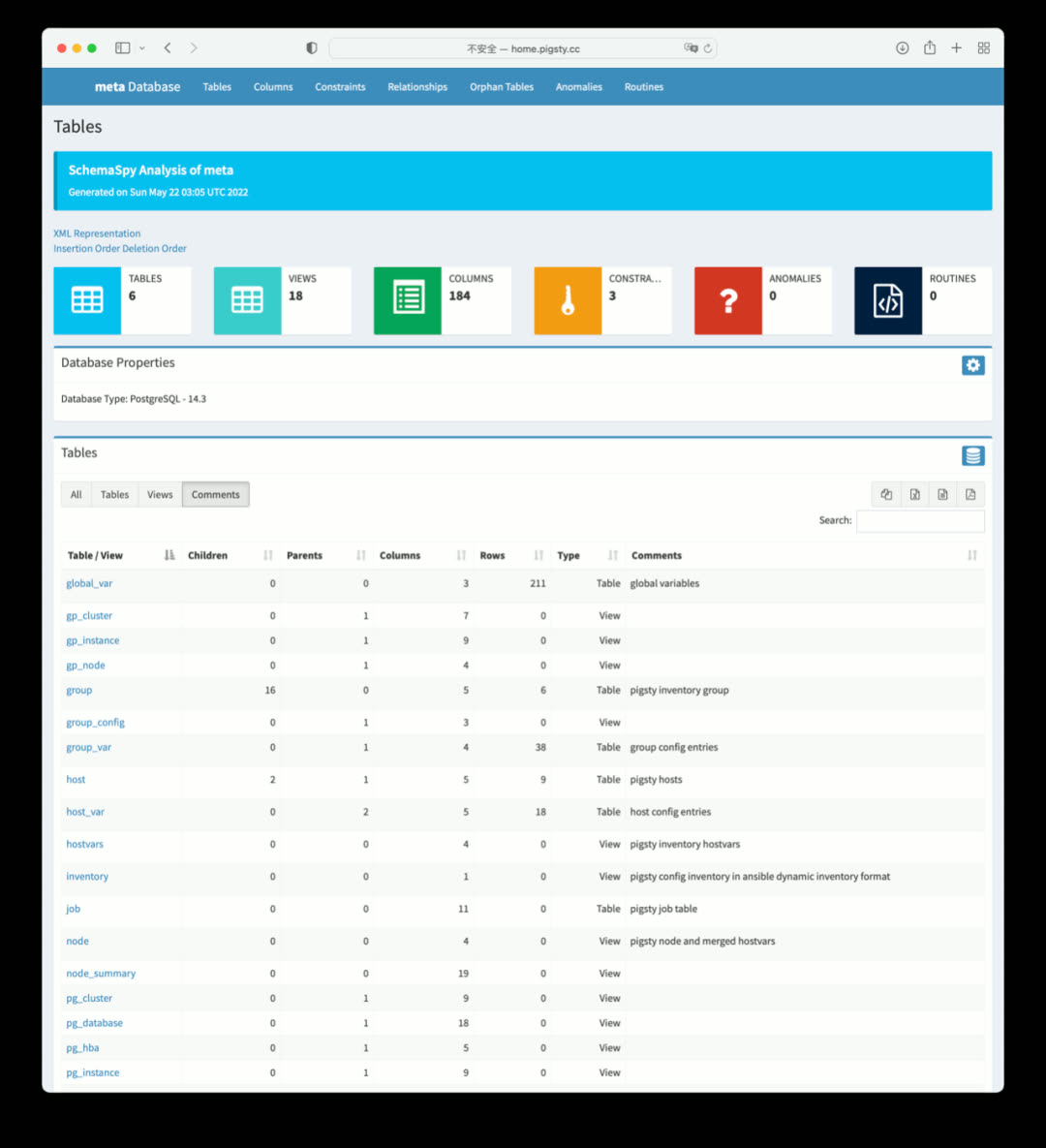
To generate detailed schema reports for a database:
bin/schemaspy 10.10.10.10 meta pigsty
Database Log Analysis Reports#
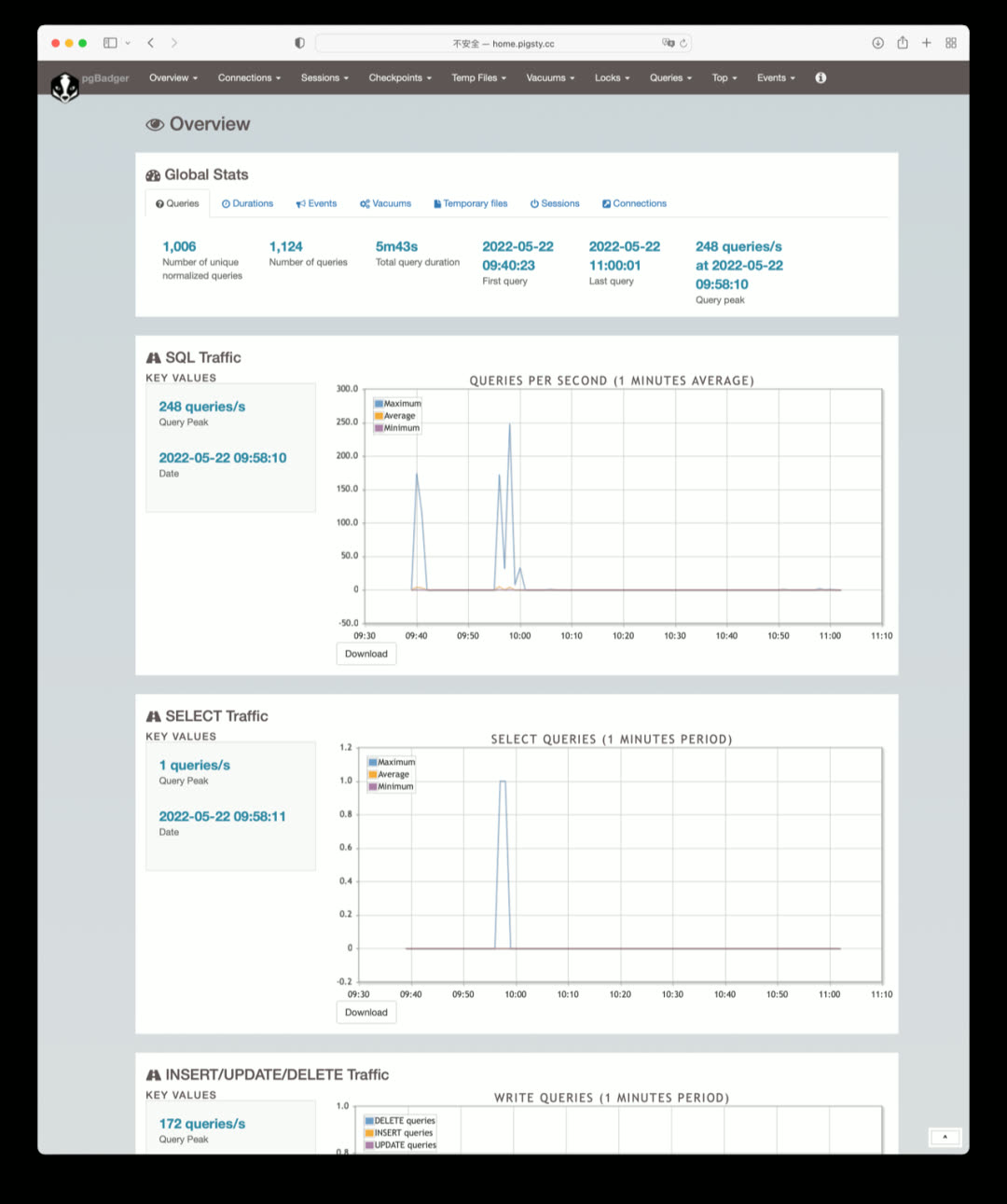
To view database log summary information:
bin/pglog-summary 10.10.10.10
More Applications#
Many well-known software applications can be launched with Pigsty + Docker:
| Application | Description |
|---|---|
| Gitlab | Open-source code hosting platform using PG |
| Habour | Open-source image registry using PG |
| Jira | Open-source project management platform using PG |
| Confluence | Open-source knowledge hosting platform using PG |
| Odoo | Open-source ERP using PG |
| Mastodon | Social network based on PG |
| Discourse | Open-source forum based on PG and Redis |
| KeyCloak | Open-source SSO single sign-on solution |
Better Cold Backups#
Data failures broadly fall into two categories: hardware failures/resource exhaustion (disk failure/crash) and software defects/human errors (dropping databases/tables). Physical replication addresses the former, while delayed replicas and cold backups typically address the latter. Because erroneous deletion operations are immediately replicated to replicas, hot and warm backups cannot solve errors like DROP DATABASE or DROP TABLE — you need cold backups or delayed replicas.
In Pigsty v1.5, the cold backup mechanism was improved:
- Added scheduled tasks for daily full cold backups
- Improved delayed replica creation — just declare it and it’s automatically created
- For power users,
pg_probackupis provided as a backup solution - Built-in MinIO Docker images lay the foundation for out-of-the-box offsite disaster recovery
Scheduled Tasks#
Pigsty v1.5 supports configuring scheduled tasks for nodes, including both append and overwrite modes for /etc/crontab. Basic physical cold backups, log analysis, schema dumps, garbage collection, and statistics collection can all be managed in a unified, declarative way.
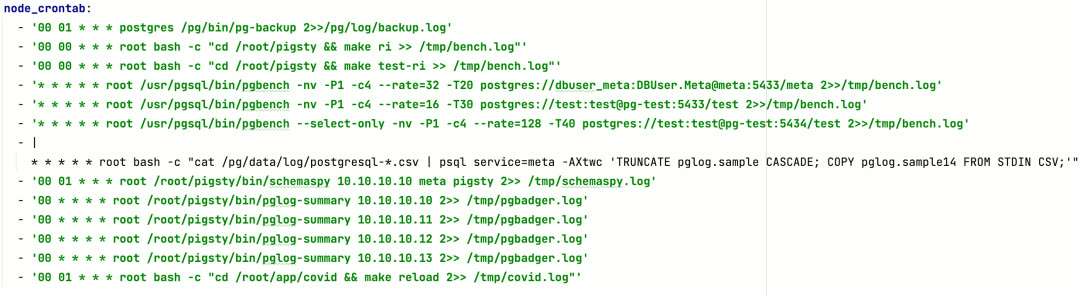
The most important is the default daily full backup at 1:00 AM. Combined with Pigsty’s default last-day WAL archive, you can restore the database to any state within the past day, providing a solid safety net for software defects and human-error-induced data loss.
Delayed Replicas#
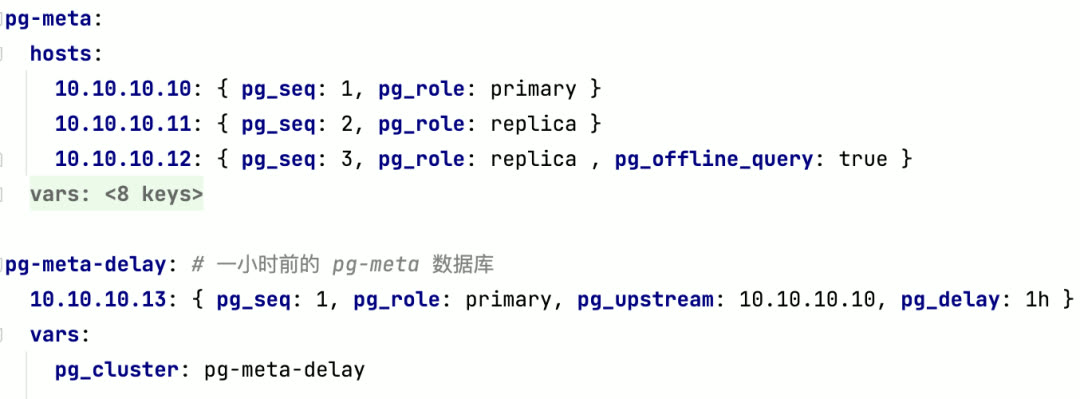
In Pigsty v1.5, creating a delayed replica no longer requires manually running patronictl edit-config to adjust cluster configuration — just declare it like this to create a delayed replica (cluster):
CMDB Compatibility Improvements#
Pigsty has an optional CMDB, allowing you to store configuration in the default PostgreSQL database on the meta node instead of the default config file pigsty.yml.
Pigsty CMDB was first introduced in v0.8, designed only for PostgreSQL. When Pigsty started supporting Redis, Greenplum, and more database types, the original design became outdated. So in Pigsty v1.5, the CMDB was redesigned.
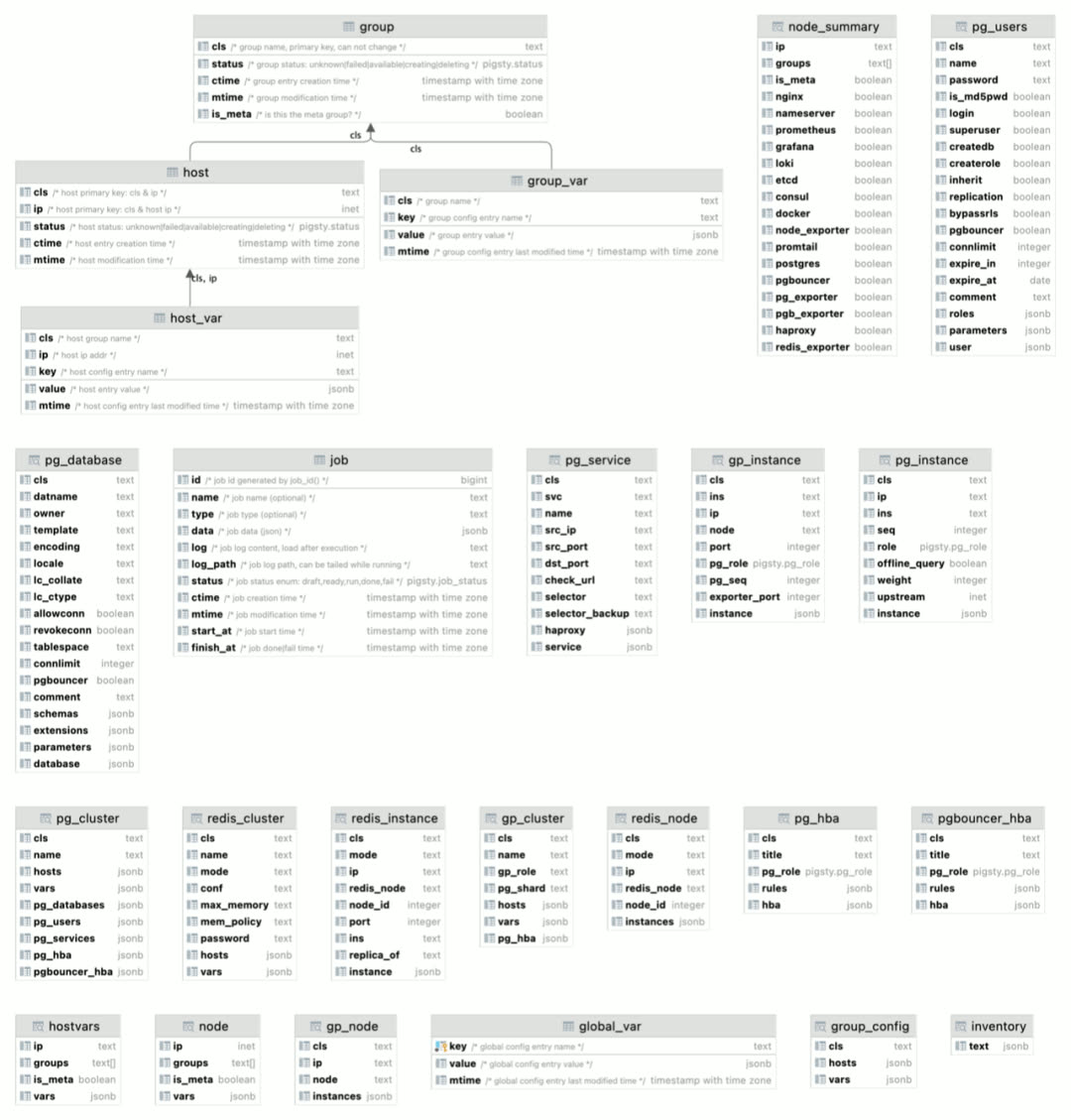
Just use bin/inventory_load to load the current config file into CMDB, and bin/inventory_cmdb to switch to CMDB mode. When using CMDB, you can view the visual configuration inventory directly from Grafana’s CMDB Overview panel:
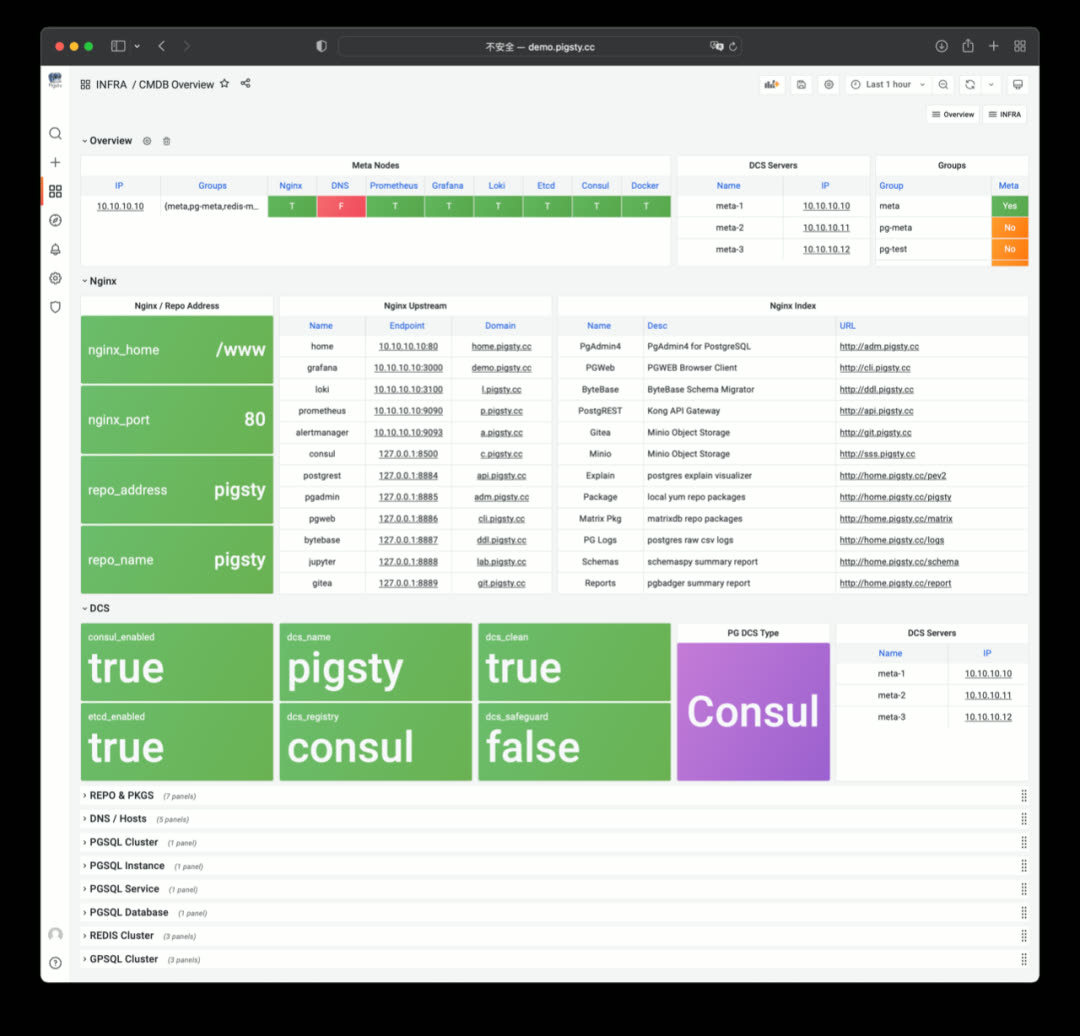
You can see PostgreSQL, Redis, and Greenplum/MatrixDB cluster member information from CMDB Overview.
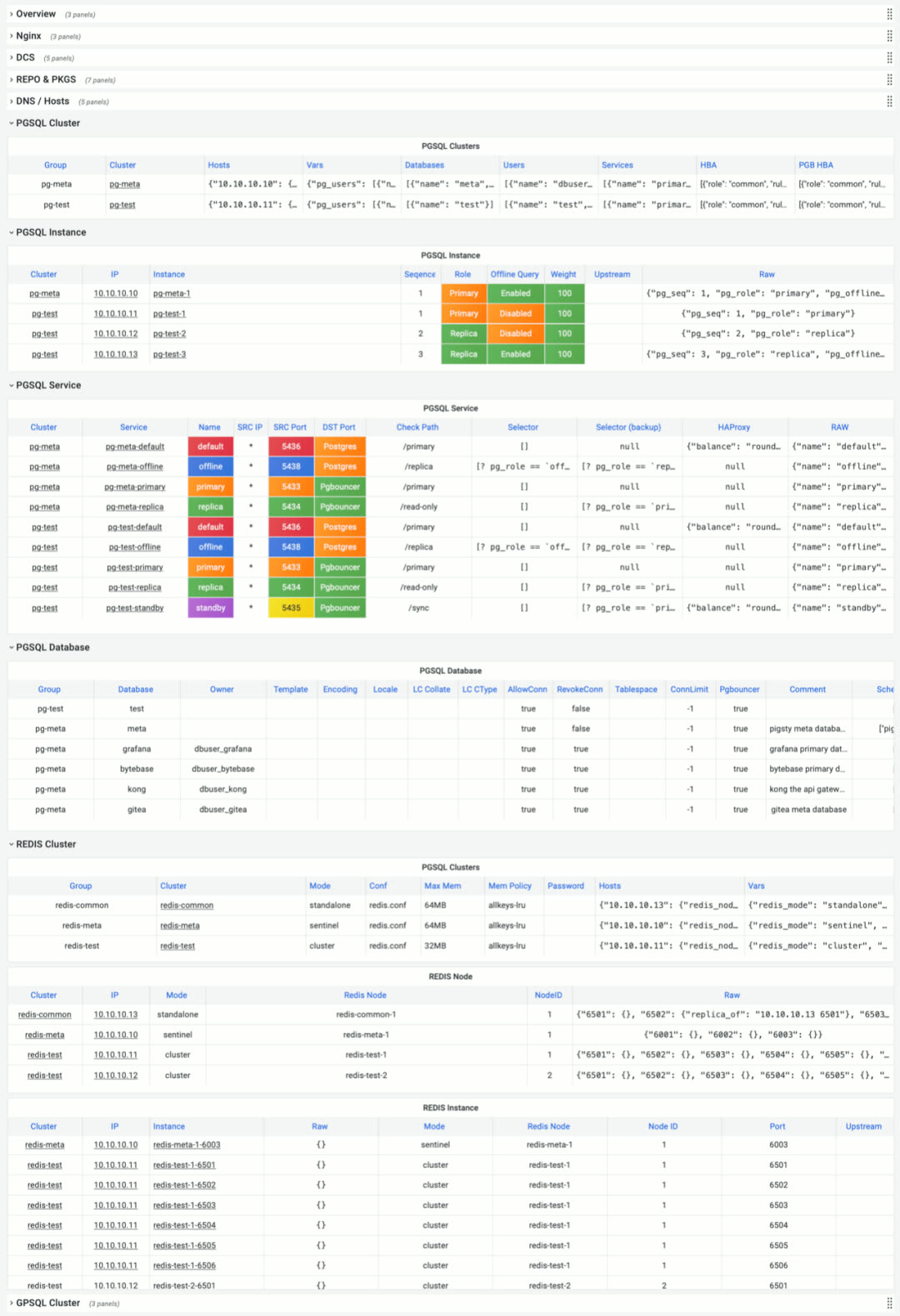
You can adjust configuration directly via SQL, or via the API exposed by PostgREST, for example creating new clusters or scaling.
PostgREST is a binary component that automatically generates REST APIs from PostgreSQL database schemas, bundled in Pigsty v1.5’s Docker image package.
cd ~/pigsty/app/postgrest; make up
It can also auto-generate API definitions via Swagger OpenAPI Spec, expose API documentation with Swagger Editor, and generate client stubs in different programming languages.
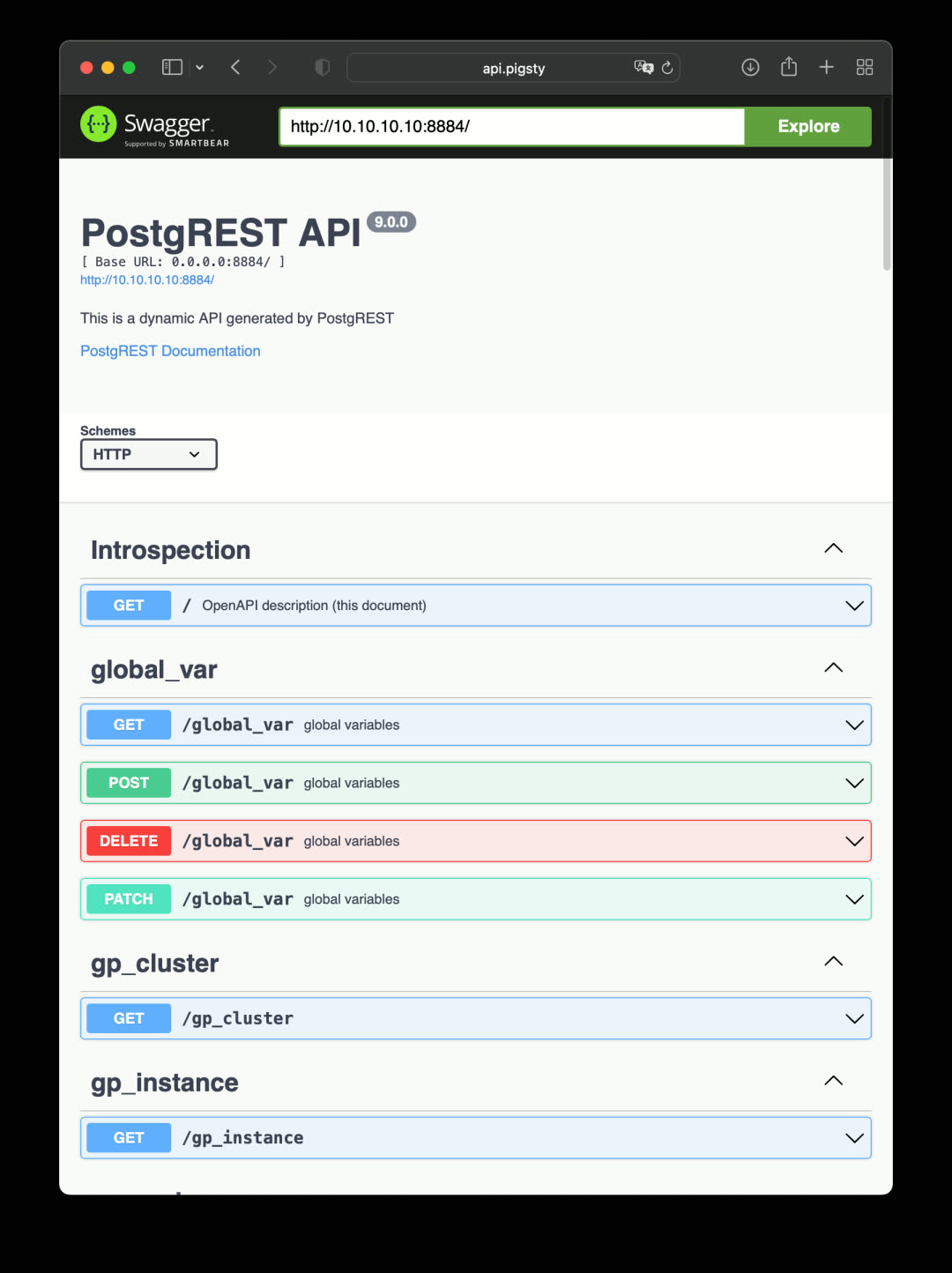
PostgREST isn’t just for exposing CMDB CRUD interfaces. If you already have a well-designed database schema, PostgREST can immediately build a backend REST API service without hand-coding tedious CRUD logic — complex logic can be exposed via stored procedures.
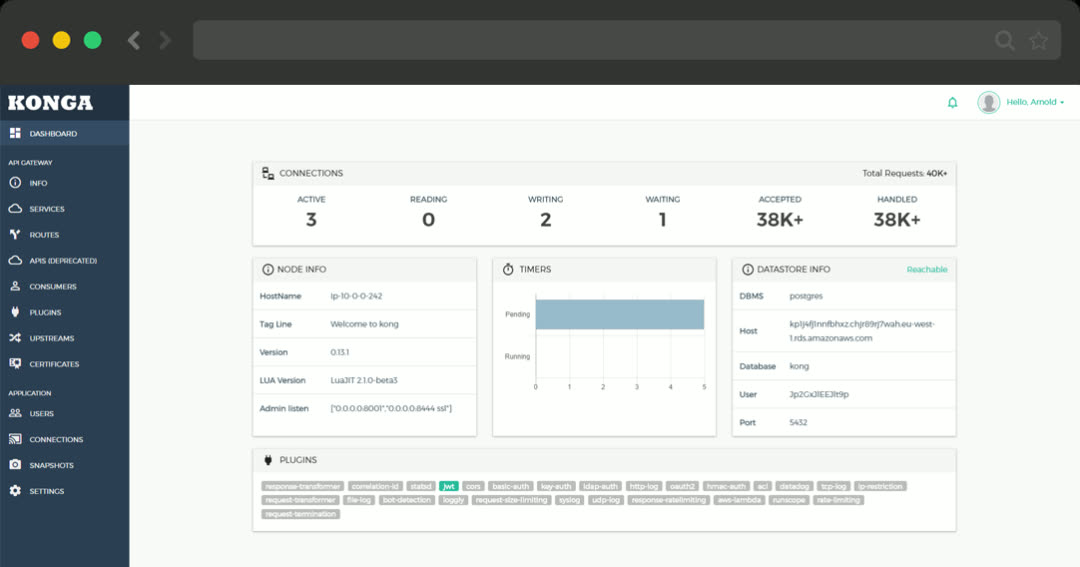
For more powerful API support, consider the Kong API gateway. It can turn any existing API into a full-featured API service, enabling various authentication mechanisms, automatic logging, tracing, rate limiting, and disaster recovery. Kong is built on Nginx + Lua (OpenResty), storing metadata in PostgreSQL and Redis:
cd ~/pigsty/app/kong; make up
Infrastructure Monitoring#
In Pigsty v1.5, infrastructure self-monitoring received major improvements: INFRA now uses the same management pattern as NODES, PGSQL, and REDIS. Infrastructure registers itself via the infra_register role, adding itself to Prometheus monitoring targets. Corresponding dashboards were added to Grafana.
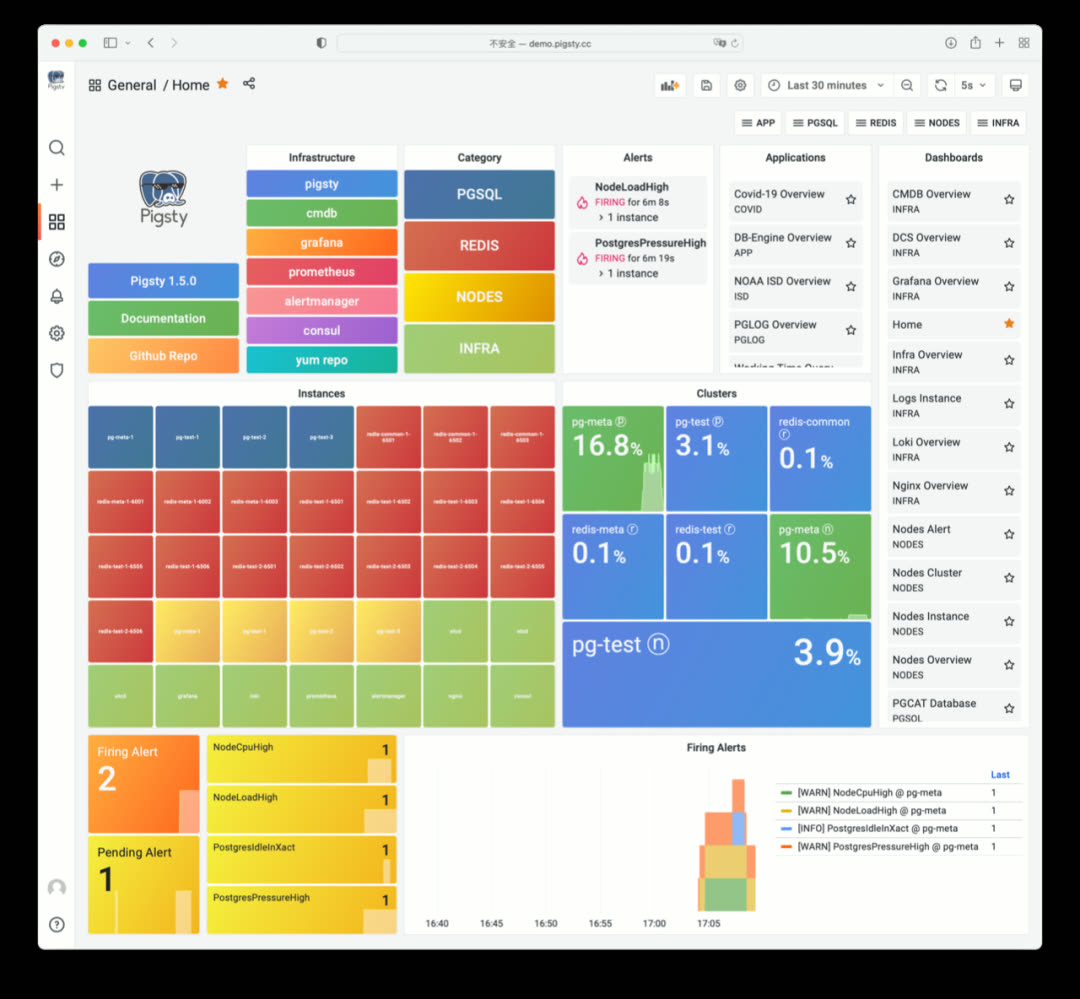
In Pigsty v1.5’s Home dashboard, infrastructure appears as light-green components, listed alongside NODES, REDIS, and PGSQL instances. Additionally, Infra services register to Service Registry (Consul) and can be automatically managed via service discovery.
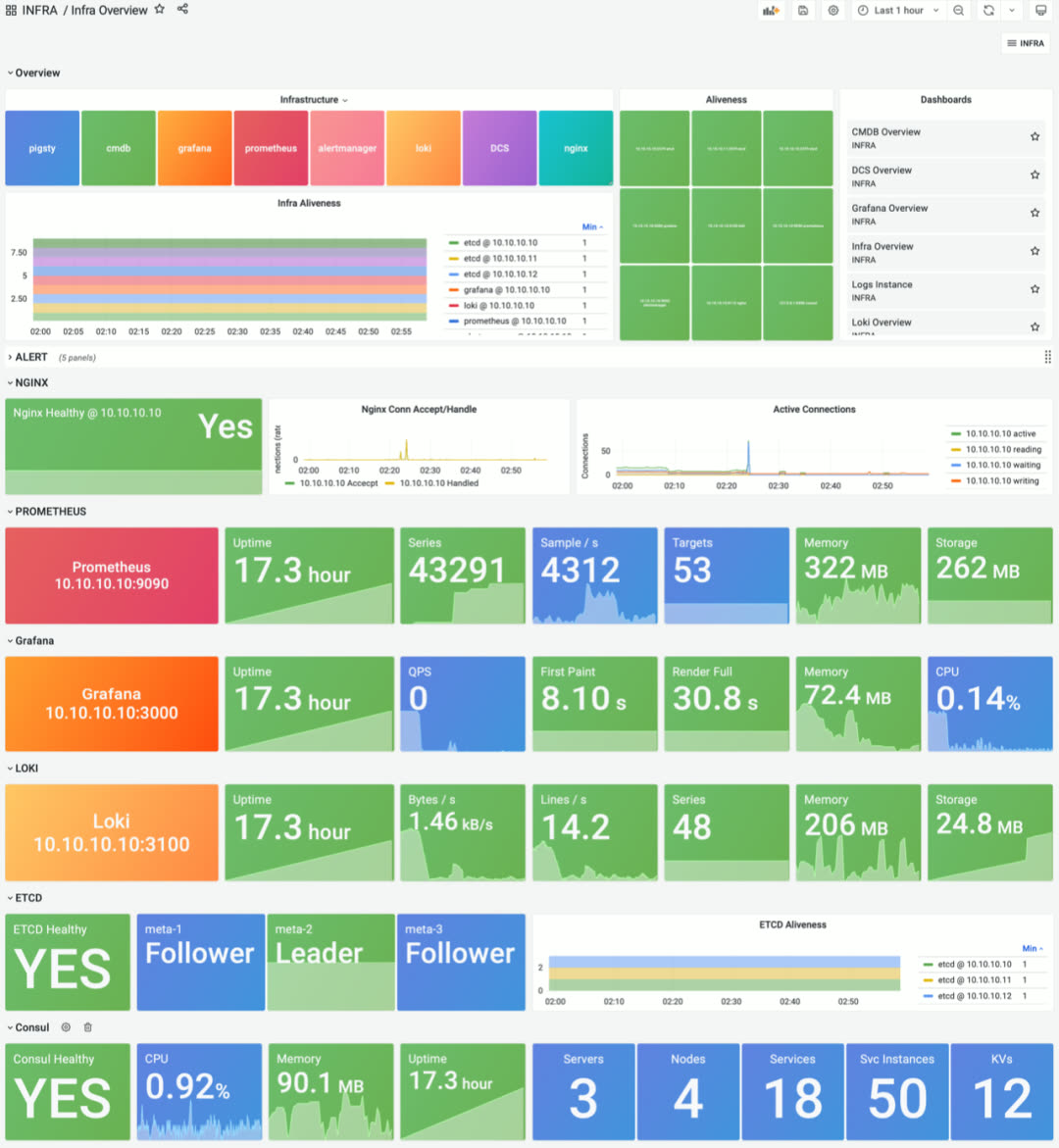
INFRA Overview provides basic status and quick navigation for all infrastructure components
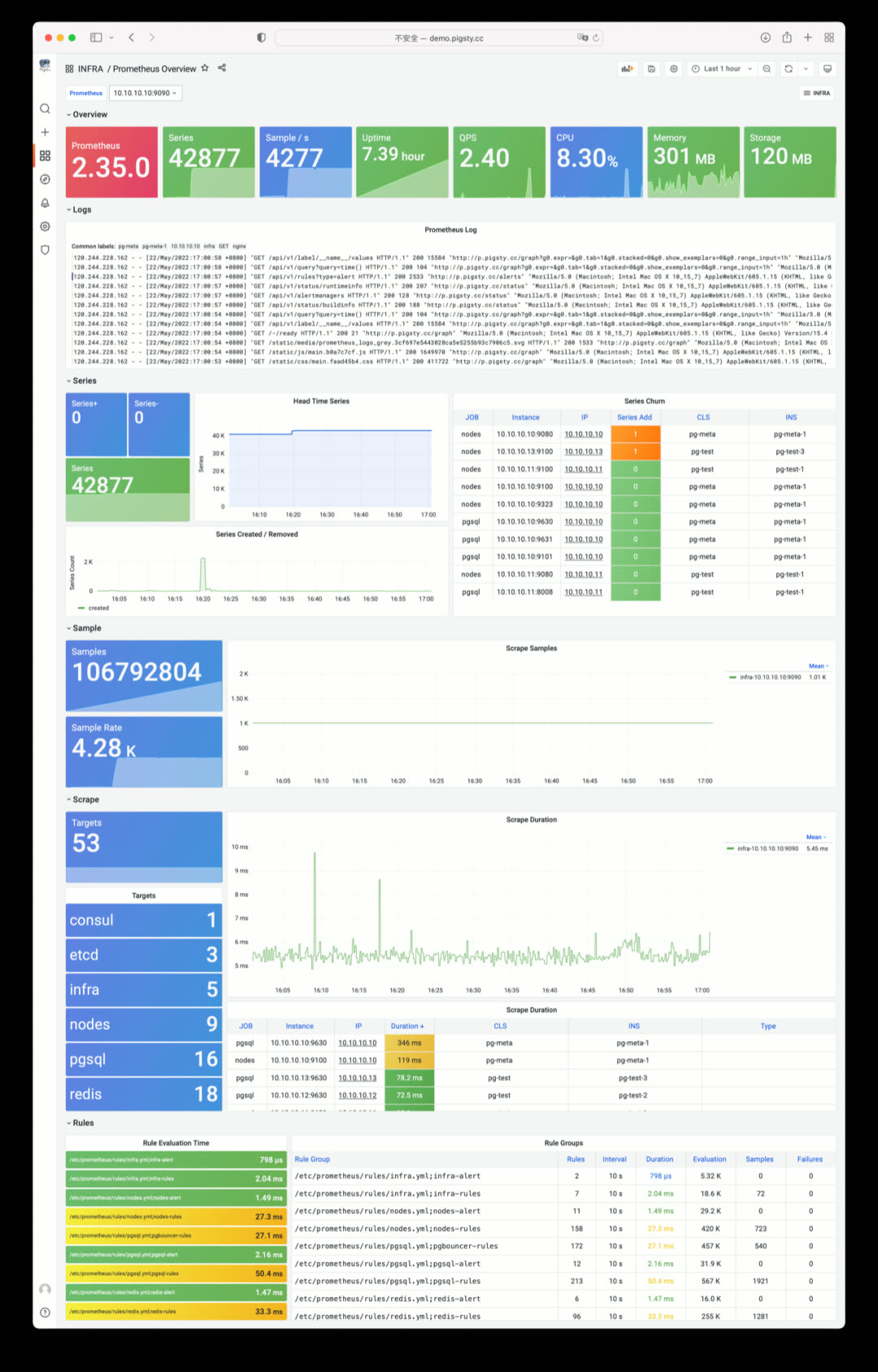
Prometheus Overview: time-series database self-monitoring
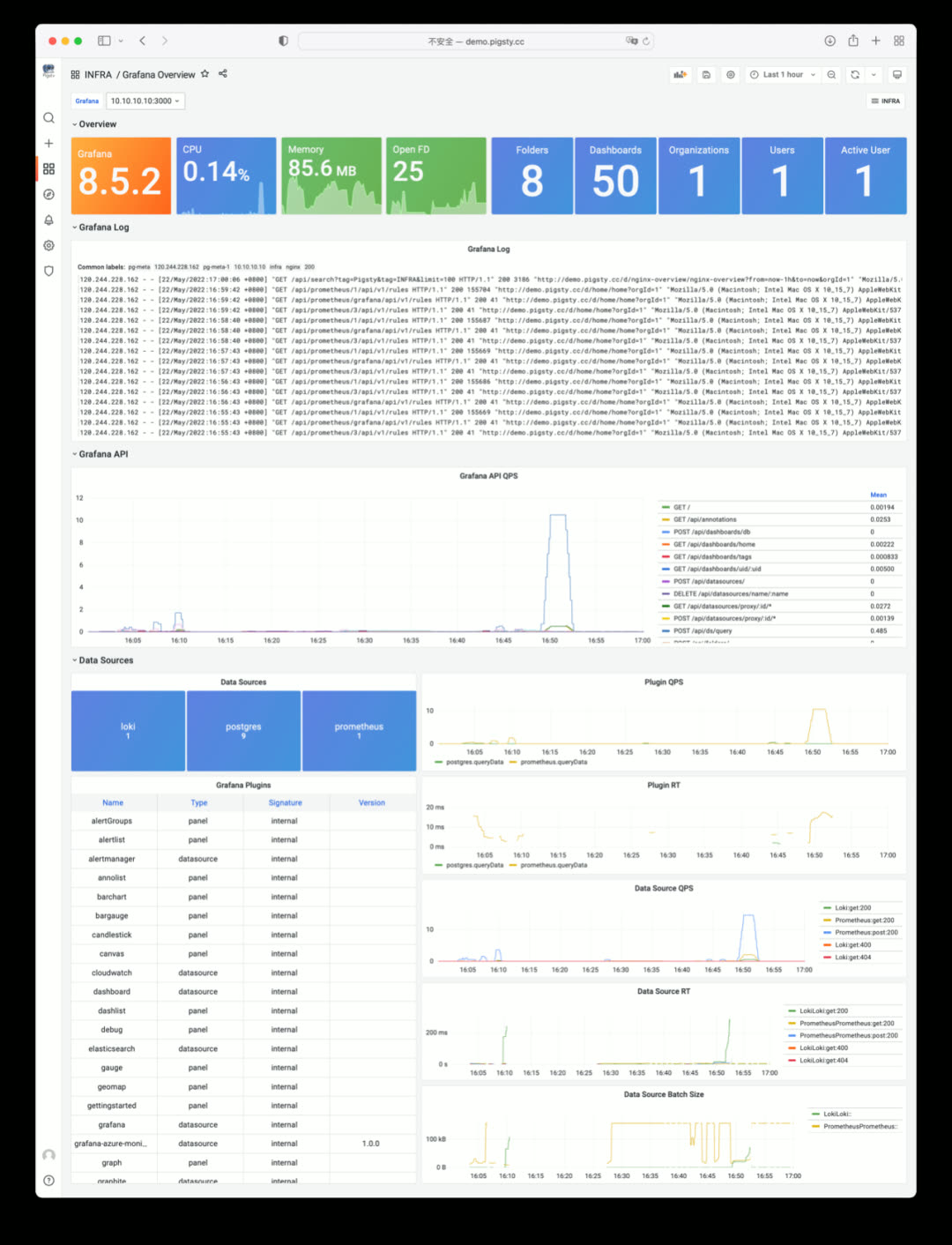
Grafana Overview: monitoring dashboard self-monitoring
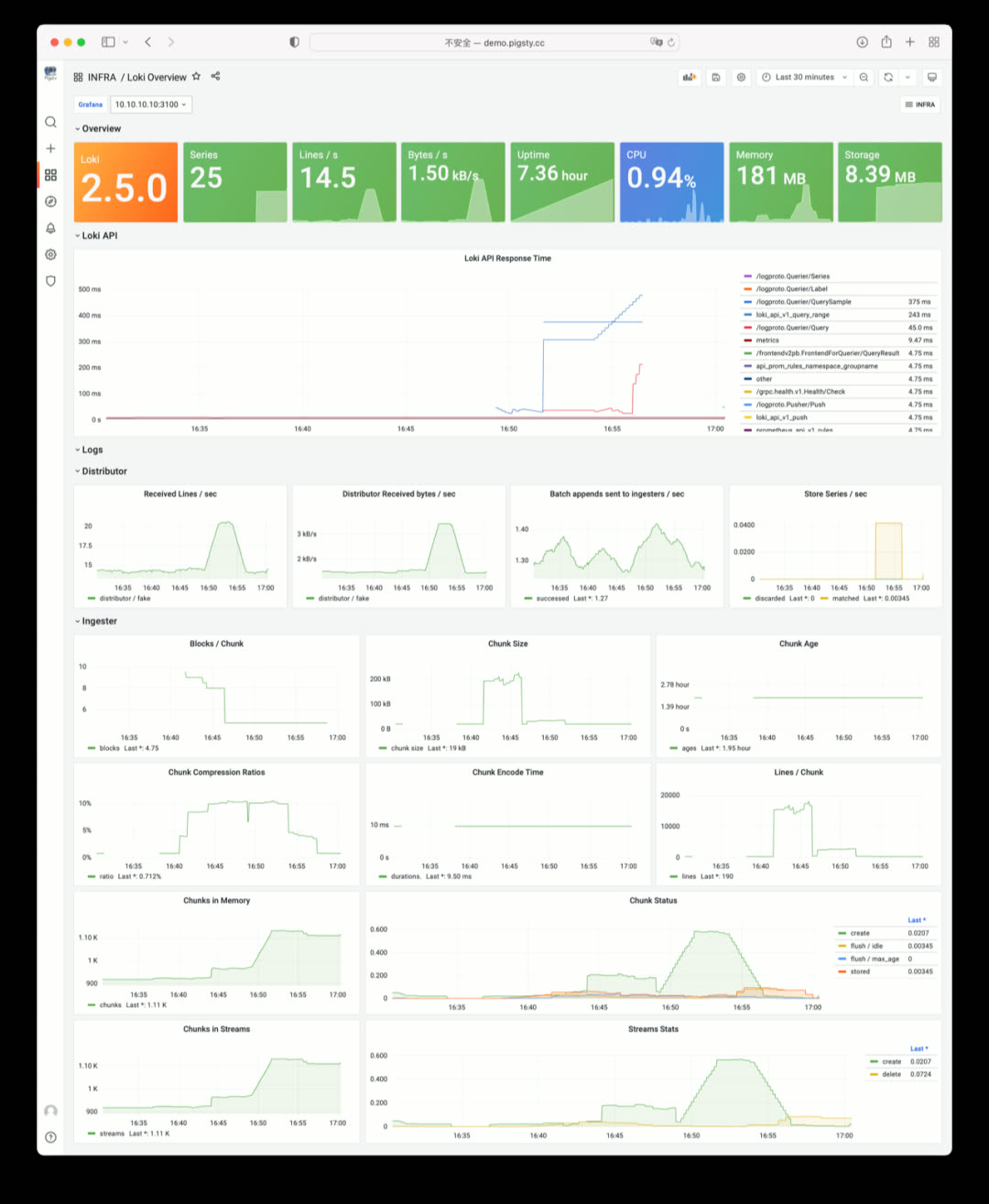
Loki Overview: log collection component self-monitoring
ETCD as DCS#
In Pigsty v1.5, you can use ETCD as an alternative to Consul for PostgreSQL high-availability DCS.
Compared to Consul, ETCD lacks service discovery, built-in DNS, health checks, and an out-of-the-box UI, but ETCD requires no agent, is simpler to deploy, has higher popularity thanks to the Kubernetes ecosystem, has one fewer failure point than Consul, and offers better metric observability.
Just specify pg_dcs_type: etcd to use ETCD as DCS. You can also use both Consul and ETCD simultaneously — for example, ETCD for DCS and Consul for service discovery.
Pigsty v1.5 provides an out-of-the-box monitoring dashboard for ETCD and Consul: DCS Overview
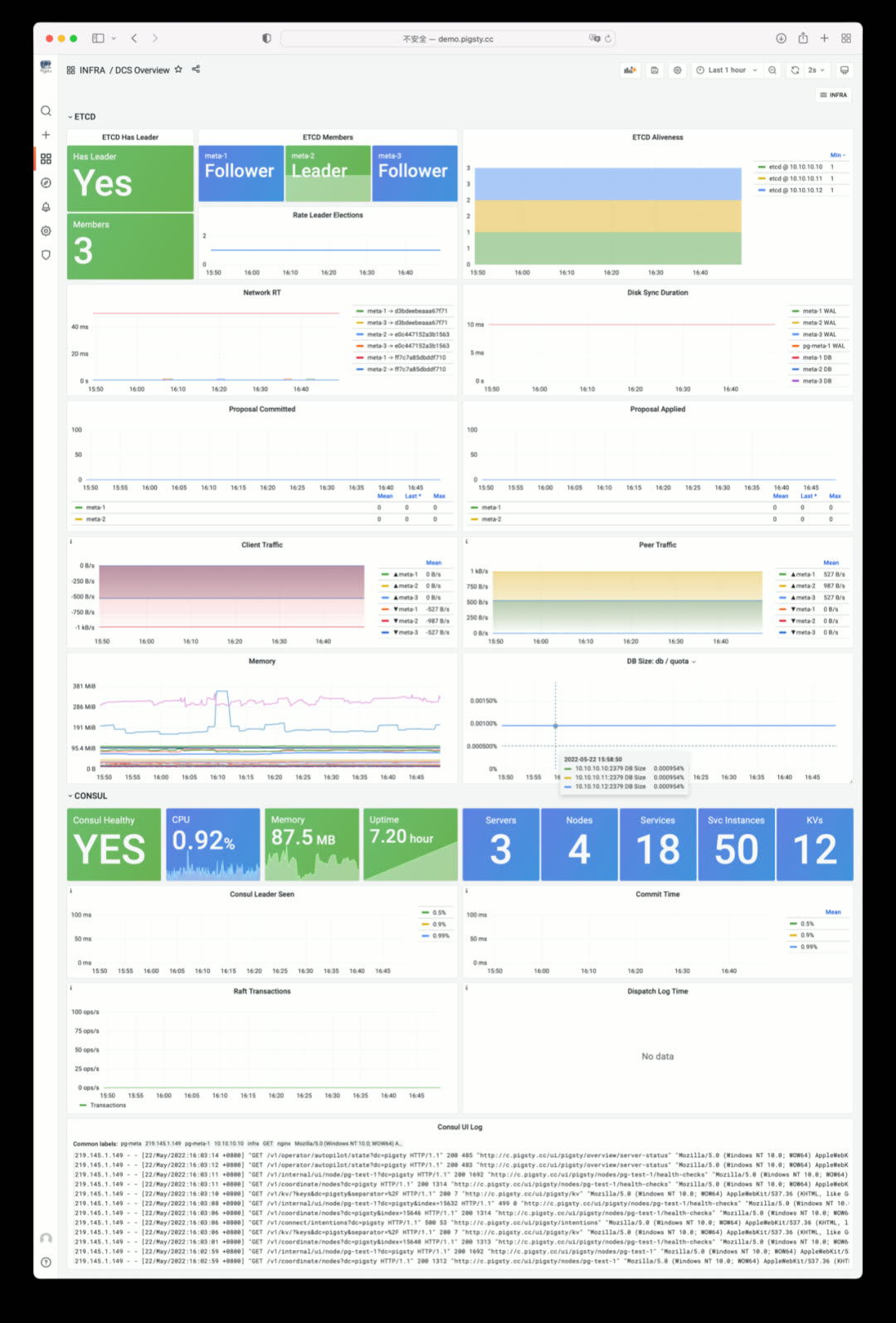
Currently, ETCD as DCS is a minimum viable implementation without CA certificates and TLS support — this will be added in a future security hardening update.
Better Log Collection and Visualization#
In Pigsty v1.5, separate access logs are enabled by default for each upstream service, with all fields parsed by Loki for direct analysis. If you have a website on Pigsty, you can immediately do interactive log traffic analysis and statistics.
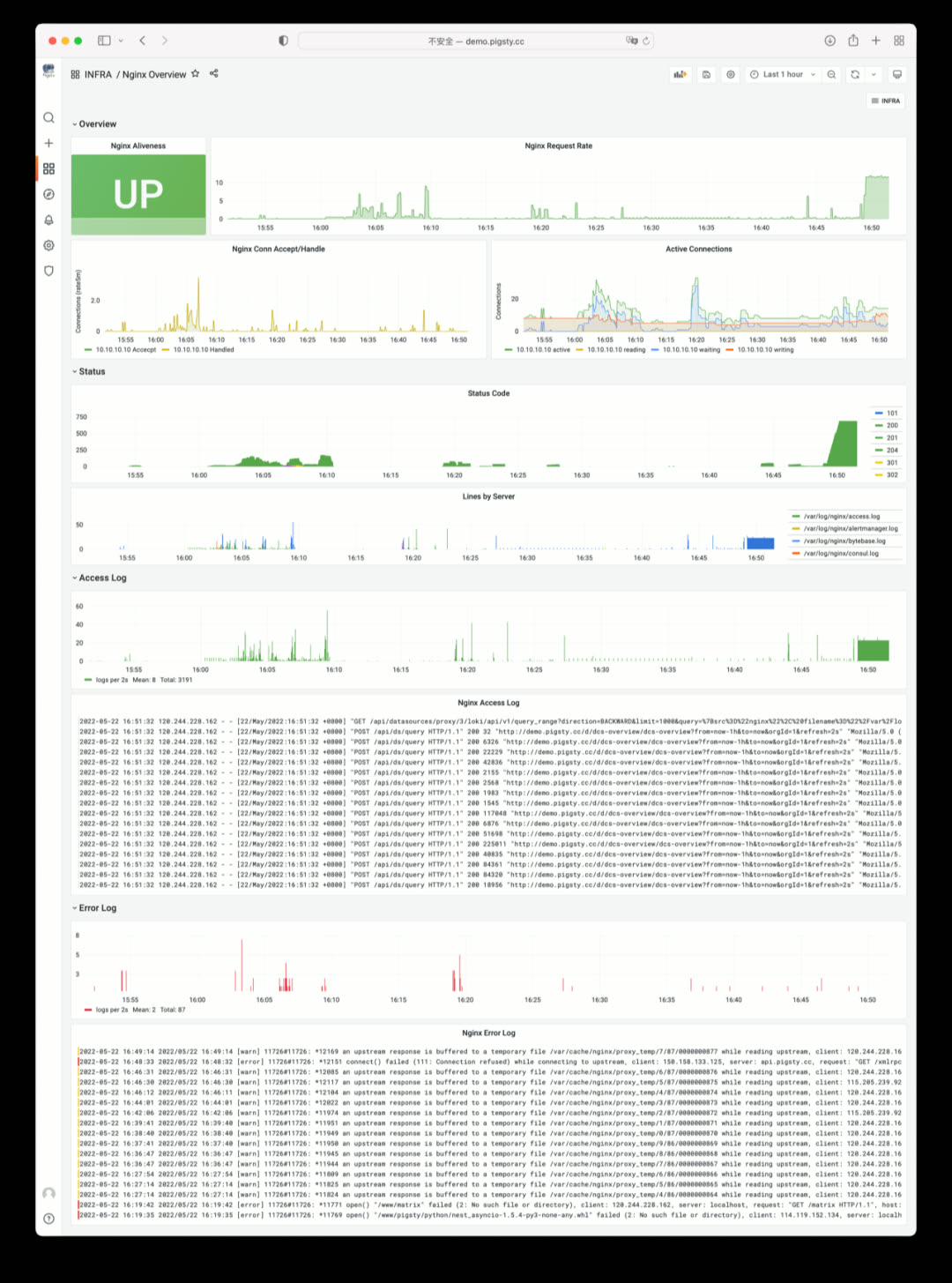
NGINX Overview: showing Nginx metrics and logs
v1.5.0 Release Notes#
Highlights#
- Complete Docker support: enabled by default on meta node with many out-of-the-box software templates: bytebase, pgadmin, pgweb, postgrest, minio, etc.
- Infrastructure self-monitoring: Nginx, ETCD, Consul, Prometheus, Grafana, Loki self-monitoring
- CMDB upgrade: compatibility improvements, supports Redis cluster/Greenplum cluster metadata, config file visualization
- Service discovery improvements: Consul can auto-discover all monitoring targets and integrate with Prometheus
- Better cold backup support: default scheduled backup tasks,
pg_probackupbackup tool, one-click delayed replica creation - ETCD can now be used as PostgreSQL/Patroni DCS service, as an alternative to Consul
- Redis playbook/role improvements: now allows init and remove operations for individual Redis instances, not just entire Redis nodes
Monitoring System#
Dashboards
- CMDB Overview: visualize Pigsty CMDB Inventory
- DCS Overview: view Consul and ETCD cluster monitoring metrics
- Nginx Overview: view Pigsty Web access metrics and logs
- Grafana Overview: Grafana self-monitoring
- Prometheus Overview: Prometheus self-monitoring
- INFRA Dashboard redesigned to reflect overall infrastructure status
Monitoring Architecture
- Now allows Consul for service discovery (when all services are registered to Consul)
- All Infra components now enable self-monitoring and register to Prometheus and Consul via
infra_registerrole - Metrics collector pg_exporter updated to v0.5.0, new features:
scaleanddefault, allowing metric multiplication factors and default values pg_bgwriter,pg_wal,pg_query,pg_db,pgbouncer_stattime-related metrics now uniformly scaled to seconds from milliseconds/microseconds- Related counter metrics in
pg_tablenow have default value0instead ofNaN pg_classmetrics collector removed by default, related metrics added topg_tableandpg_indexcollectorspg_table_sizemetrics collector now enabled by default with 300-second cache time
Deployment#
- New optional package
docker.tgzwith common app images: Pgadmin, Pgweb, Postgrest, ByteBase, Kong, Minio, etc. - New ETCD role: automatically deploys ETCD service on DCS Server nodes and integrates with monitoring
pg_dcs_typespecifies DCS service for PG high-availability: Consul (default), ETCD (alternative)node_crontabparameter for configuring node scheduled tasks like database backups, VACUUM, statistics collection- New
pg_checksumoption: when enabled, database cluster enables data checksums (previously onlycrittemplate enabled by default) - New
pg_delayoption: when instance is Standby Cluster Leader, this parameter configures a delayed replica - New
pg_probackuppackage, default rolereplicatornow has backup-related function permissions - Redis deployment split into two parts: Redis node and Redis instance,
redis_portparameter controls specific instances - Loki and Promtail now installed via
fpm-built RPM packages - DCS3 config template now uses a 3-node
pg-metacluster with a single-node delayed replica
Software Upgrades#
- PostgreSQL upgraded to 14.3
- Redis upgraded to 6.2.7
- PG Exporter upgraded to 0.5.0
- Consul upgraded to 1.12.0
- vip-manager upgraded to v1.0.2
- Grafana upgraded to v8.5.2
- Loki & Promtail upgraded to v2.5.0, using fpm packaging
Bug Fixes#
- Fixed Loki and Promtail default config filename issues
- Fixed Loki and Promtail environment variable expansion issues
- Complete English documentation translation and revision; documentation JS resources now served locally, no internet access required
API Changes#
New Parameters
node_data_dir: Main data mount path, created if doesn’t existnode_crontab_overwrite: Overwrite/etc/crontabinstead of appendingnode_crontab: Node crontab content to append or overwritenameserver_enabled: Enable nameserver on this infra node?prometheus_enabled: Enable prometheus on this infra node?grafana_enabled: Enable grafana on this infra node?loki_enabled: Enable loki on this infra node?docker_enable: Enable docker on this infra node?consul_enable: Enable consul server/agent?etcd_enable: Enable etcd server/client?pg_checksum: Enable pg cluster data checksums?pg_delay: Application delay when backup cluster leader replays replication
Parameter Redesign
*_clean is now a boolean parameter for cleaning existing instances during init.
*_safeguard is also a boolean parameter to prevent cleaning running instances during any playbook execution.
pg_exists_action->pg_cleanpg_disable_purge->pg_safeguarddcs_exists_action->dcs_cleandcs_disable_purge->dcs_safeguard
Parameter Renames
node_ntp_config->node_ntp_enablednode_admin_setup->node_admin_enablednode_admin_pks->node_admin_pk_listnode_dns_hosts->node_etc_hosts_defaultnode_dns_hosts_extra->node_etc_hostsnode_dns_server->node_dns_methodnode_local_repo_url->node_repo_local_urlsnode_packages->node_packages_defaultnode_extra_packages->node_packagesnode_packages_meta->node_packages_metanode_meta_pip_install->node_packages_meta_pipnode_sysctl_params->node_tune_paramsapp_list->nginx_indexesgrafana_plugin->grafana_plugin_methodgrafana_cache->grafana_plugin_cachegrafana_plugins->grafana_plugin_listgrafana_git_plugin_git->grafana_plugin_githaproxy_admin_auth_enabled->haproxy_auth_enabledpg_shared_libraries->pg_libsdcs_type->pg_dcs_type
v1.5.1 Release Notes#
Highlights#
IMPORTANT: Fixed the issue where CREATE INDEX|REINDEX CONCURRENTLY in PG14.0-14.3 could corrupt index data.
Pigsty v1.5.1 upgrades the default PostgreSQL version to 14.4. Strongly recommend updating ASAP.
Software Upgrades#
- postgres upgraded to 14.4
- haproxy upgraded to 2.6.0
- grafana upgraded to 9.0.0
- prometheus upgraded to 2.36.0
- patroni upgraded to 2.1.4
Bug Fixes#
- Fixed TYPO in
pgsql-migration.yml - Removed PID config item from HAProxy configuration
- Removed i686 packages from default packages
- Enabled all Systemd Redis Services by default
- Enabled all Systemd Patroni Services by default
API Changes#
grafana_databaseandgrafana_pgurlmarked as deprecated API, will be removed in future versions
New Applications#
- wiki.js: Build local Wikipedia with Postgres
- FerretDB: Provide MongoDB API using Postgres