

A year ago, I wrote an article called PGFS: Using a Database as a Filesystem. It started with a request from the Odoo community: make files and the PostgreSQL database recoverable together with point-in-time recovery, so both could be rolled back to the same moment.
The solution has worked quite well. It delivers entirely in software a capability that once required expensive dedicated continuous data protection hardware: rolling the filesystem and database back together to any point in time. Performance is respectable too—more than enough for applications such as Odoo and Dify.
But recently I discovered that PGFS was attracting an unexpected group of users. They were not running ERP systems. They were using it to store AI agent state.
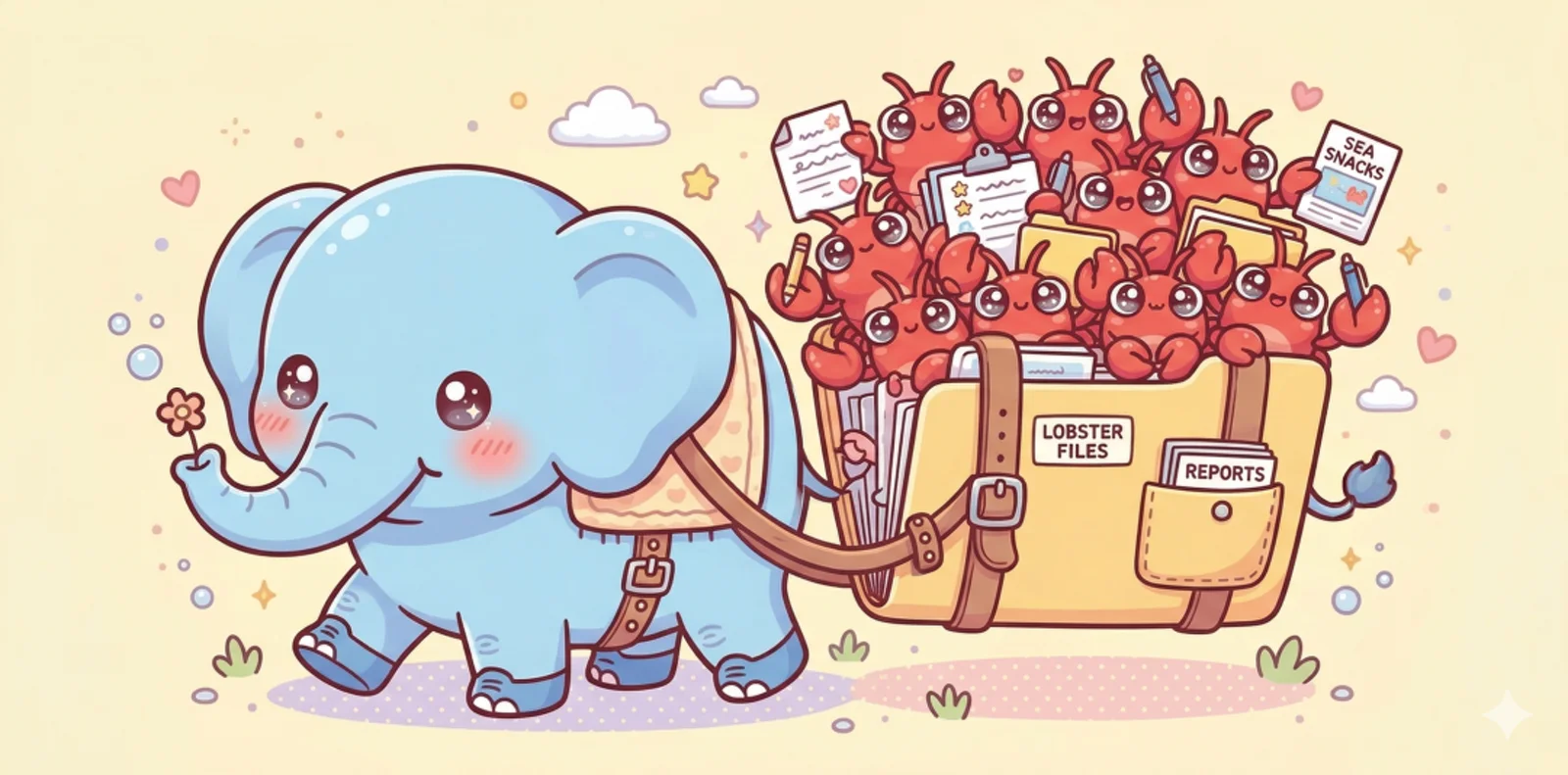
The idea is simple: PGFS mounts a PostgreSQL database as a local directory. Reading from or writing to that directory actually reads from or writes to a remote database. Put the AI agent’s working directory, configuration files, and memory there, and all of its state lives in PostgreSQL.
That made me realize PGFS may be far more useful than I originally imagined. I know of at least one company building a commercial OpenClaw distribution that already uses PGFS as its underlying shared-memory mechanism.
Does an Agent Actually Need a Database?#
Before discussing the implementation, let us start with the “why.” This question comes up constantly. My friend Jiang and I argue about it all the time: AI agents do not need databases, he says. SQLite is enough.
For a consumer running one agent on one local machine, he may be right. One person runs Claude Code, keeps its state under .claude/, and manages the code properly with Git. No problem. Using PostgreSQL for agent state in that scenario really can feel like looking for a nail because you happen to have a hammer.
But once the scenario becomes even slightly more complex, a database is unavoidable. As Turing Award winner and Postgres creator Mike Stonebraker puts it, this is the path AI agents will inevitably take.
What counts as “slightly more complex”?
Multi-agent collaboration. You begin assigning work to parallel subagents: one writes code, another writes tests, and a third reviews the result. They need to communicate task status and share context. A Markdown file as a task queue? It can work, but it is fragile.
From one person to a team. Coordination is easy to ignore when you are vibe coding alone. But once three or five people on a team each have their own agents working, you need somewhere to coordinate them. As soon as collaboration crosses machines, people, or organizations, a database becomes much more convenient than a directory on someone’s laptop.
Enterprise use. Enterprise applications inherently require centralized storage, auditing, and access control. You need continuous data protection so you can restore to any point in time. You need flexible snapshots, forks, and sharing. You also need to handle concurrent access and data consistency correctly.
The consumer endgame. Today your agent runs on one machine and has that environment to itself. But if you genuinely want something like Jarvis—an agent that runs across all your devices and provides one consistent experience—those agents will necessarily need shared memory.
As complexity grows, sooner or later you will reach for a database to solve these problems—unless you intend to reinvent a bad database on top of the filesystem.
So what unique value can a database offer an AI agent?
I see two killer features.
Killer Feature One: A Time Machine#
The first is point-in-time recovery (PITR).
When an agent breaks something in today’s AI-agent workflows, recovery can be difficult. If the agent relies entirely on the filesystem and Git for state, you may be fine if you work only with code, maintain a disciplined Git workflow, and commit and push promptly. But in reality, a great deal of state never enters Git: agent configuration, intermediate artifacts, temporary data, working memory, and more. One bad operation can destroy it permanently.
We have already seen cases of Claude deleting code repositories, never mind data that was not under version control at all.
You might say, “I can take snapshots with Git or ZFS.” You can, but there are two problems. First, snapshots represent discrete points in time. You can return to “the previous snapshot,” but not necessarily to the precise moment 3 minutes and 27 seconds ago—say, one second before the accidental deletion. Second, you must manage those snapshots explicitly: when to create them, how long to retain them, and how to clean them up. That is an operational burden of its own.
Historically, there were only two ways to get the ability to return to any point in time: buy expensive CDP hardware, or build a complex logging system yourself.
PGFS offers a third option: turn every filesystem write into a database write, then inherit PITR from PostgreSQL’s write-ahead log.
More concretely, when you write a file into a PGFS-mounted directory, its data is actually written into PostgreSQL’s jfs_blob table. Filesystem operations and database operations share the same WAL stream. When you perform PITR, the database and filesystem return to the same target time, down to the microsecond timestamp of each operation.
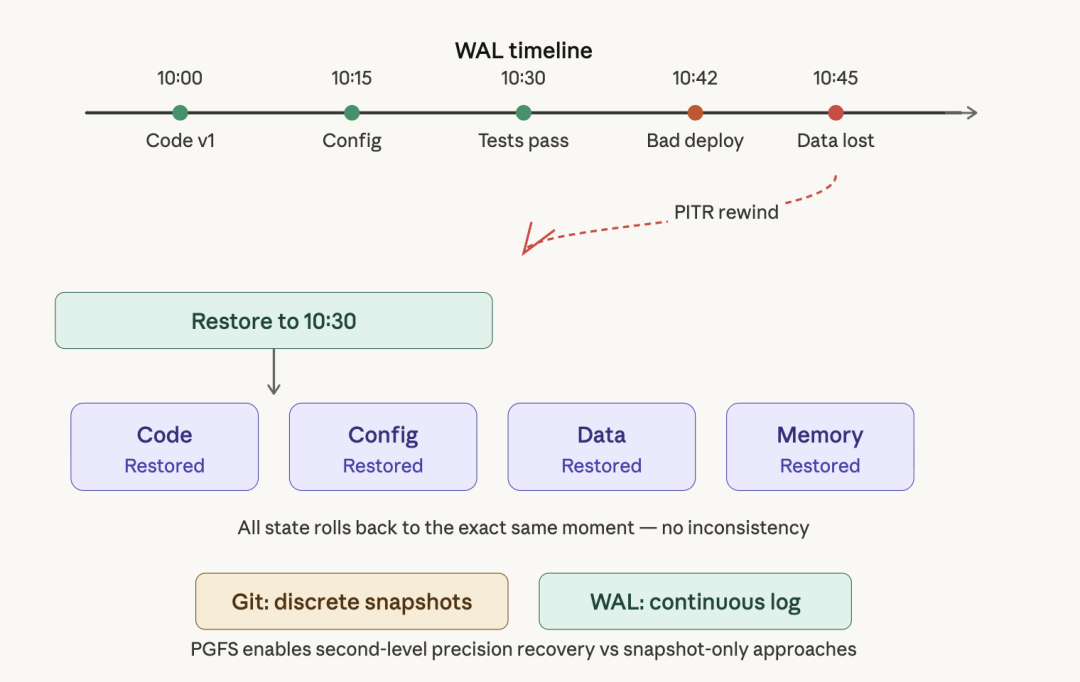
That gives your agent a time machine: no matter what it does, you can restore everything to any point in time. Code, data, configuration, and memory all roll back together, with no inconsistency between them.
This also unlocks another capability: instant cloning and branching. Because the code’s state is ultimately data inside the database, you can create a new database instance from any point in time, with its filesystem state and database state perfectly aligned. It is like a Git branch, except the business data in the database branches with the code. Different agents can work on different “branches” without interfering with one another. Broke something? Roll back. Want to try another approach? Fork a fresh environment. A filesystem-only design cannot do this.
For AI agents, it is hard to overstate the value of this capability. It gives you an “unlimited undo” safety net—or, in video-game terms, a save system you can load at any time.
Killer Feature Two: A Shared Brain#
If you have only one person and one agent, there is indeed nothing to share. But once you start using agents and subagents in parallel, they need an efficient place to communicate.
How does the usual single-machine setup work today? You write a Markdown file in the project directory as a to-do list, manually assign tasks, and send subagents off to execute them. It works, barely, for one person. But put those tasks in a database table, let every agent claim work, update status, and report results there, and you have a natural task-scheduling hub. There is no need for file locks or polling; the database’s MVCC and LISTEN/NOTIFY handle concurrency naturally.
More importantly, a local directory is awkward to share with other people. You can use FTP or NFS, but configuration is cumbersome and security becomes another concern.
PGFS provides a much cleaner sharing model. Imagine this architecture:
- You run Pigsty, including PostgreSQL, on a cloud server.
- You create a PGFS mount point there, such as
/fs. - You put all project code, agent configuration, and shared memory under that directory.
- Anyone on the team who has the database connection string can mount the directory on their own machine with one command.
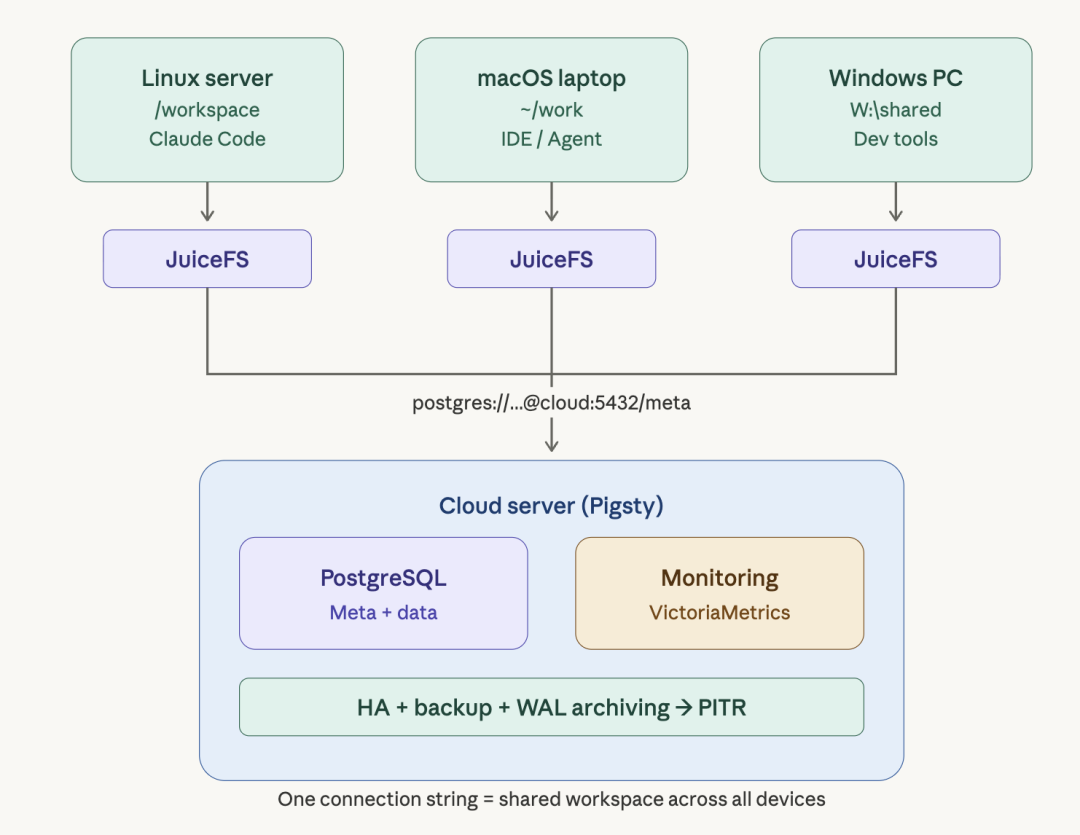
One connection string and one mount command let multiple people, machines, and agents share the same workspace.
That is how I work today: I keep all of my projects in a Pigsty-based monorepo. I can work directly with Claude Code on the cloud server while also mounting the cloud-hosted PGFS locally for local reads and writes. Multiple platforms, multiple instances, seamless synchronization.
Each person can own a subproject while collaborating inside one overall repository.
Now look further ahead. If you really want a Jarvis-style digital assistant, it will need a central place to store state. You cannot give every agent an isolated memory. Otherwise, you do not get one assistant; you get a crowd of underlings that know nothing about one another.
The most natural way for multiple agents to share memory is to give them a hub: a cloud VM running Pigsty, with the database mounted locally through a URL. Every agent can read and write shared state while retaining its own private memory.
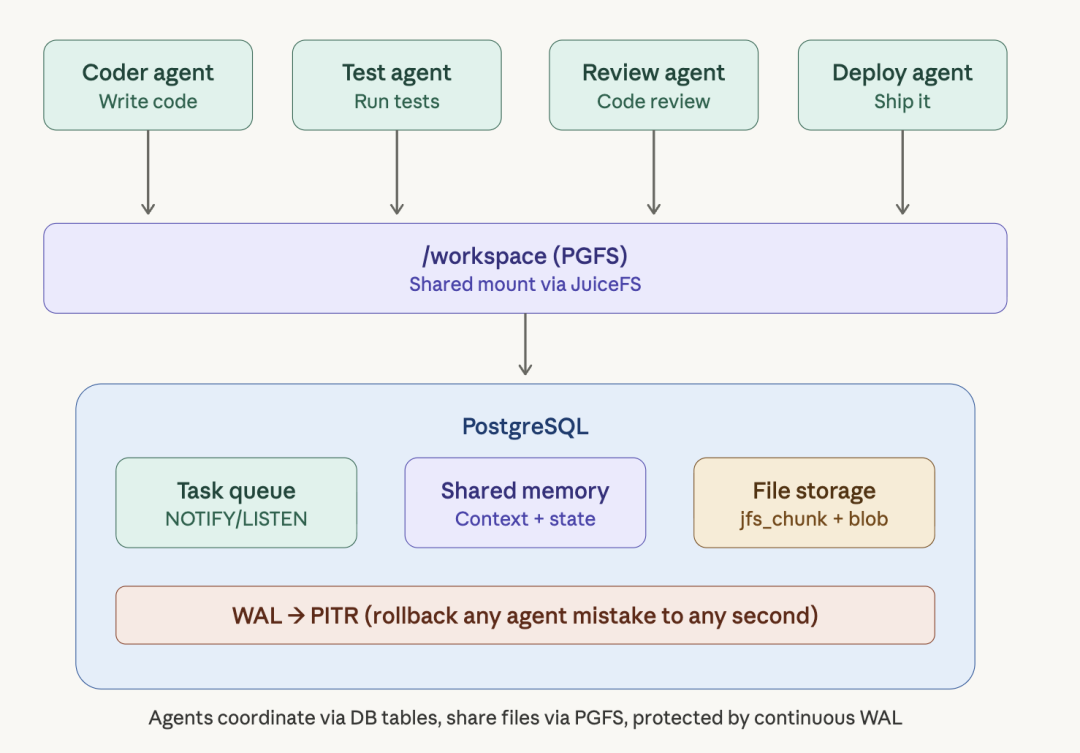
There are plenty of other benefits beyond these two: ACID transactions, high availability, observability, backup and recovery, replication, CDC tooling, and more. I will not expand on all of them here.
How to Build It: Pigsty’s JUICE Module#
That covers the “why.” Now for the “how.” The underlying capability has existed for a year; I packaged JuiceFS for Pigsty back then. Pigsty 4.0 officially introduced the JUICE module, turning the entire process into declarative configuration and one-command deployment.
What Is JuiceFS?#
JuiceFS is a high-performance, POSIX-compatible distributed filesystem. Its architecture is straightforward: a metadata engine plus a data-storage backend. The metadata engine manages the directory tree and file attributes; the storage backend holds file contents.
The core idea behind PGFS is this: JuiceFS can use PostgreSQL as both its metadata engine and its data-storage backend. All file metadata and contents live in PostgreSQL and share the same WAL stream. (TimescaleDB recently released TigerFS, which offers similar functionality, but it is less mature. I have packaged and integrated that as well.)
Declarative, One-Command Deployment#
Pigsty’s vibe configuration template already includes a working example. Run these commands on a fresh Linux server, and you will have a predefined PGFS mounted at /fs:
curl -fsSL https://repo.pigsty.io/get | bash
cd ~/pigsty
./configure -c vibe -g   # Use vibe mode and generate random passwords
./deploy.yml             # Deploy infrastructure and PostgreSQL
./juice.yml              # Deploy the JuiceFS filesystem
Every read and write under the default /fs directory lands in the database. You can mount that same database at another path—or at local mount points on multiple computers—to share the directory. All of it is defined by this short configuration:
juice_instances:
  jfs:
    path: /fs
    meta: postgres://dbuser_meta:DBUser.Meta@10.10.10.10:5432/meta
    data: --storage postgres --bucket 10.10.10.10:5432/meta \
      --access-key dbuser_meta --secret-key DBUser.Meta
    port: 9567
That is all. The system automatically formats the JuiceFS volume, mounts it, configures it to start at boot, and integrates monitoring.
You can easily use the same pattern to define multiple JuiceFS instances, or mount one instance on several different machines:
app:
  hosts:
    10.10.10.11: {}
    10.10.10.12: {}
  vars:
    juice_instances: {...}
Better still, the shared mount is not limited to those Linux servers. macOS and Windows users can mount the cloud-hosted PGFS locally too:
juicefs mount "postgres://dbuser_meta:DBUser.Meta@10.10.10.10:5432/meta" ~/work -dOne connection string is the entry point to your “shared cloud drive.” It is much simpler than NFS or FTP. I am preparing a one-click setup script for macOS and Windows: enter a URL, and it will configure everything for you.
Experienced users will immediately see the trick: move the dot-directories that Claude Code, Codex, and OpenClaw keep under your home directory onto the mounted shared workspace, then symlink them back to their original locations. Your agent state now lives in the database.
And the best part is that performance is quite respectable. PGFS will certainly deliver less throughput than a native filesystem, but actual measurements are not bad: file reads and writes deliver roughly 100 MB/s, and JuiceFS has a local caching mechanism as well. That is more than enough for workloads such as Odoo and coding agents.
Of course, the real highlight is the black magic of rolling the entire environment back to any point in time with a single PITR operation after an agent wrecks it.
Conclusion#
Back to the original question: does an AI agent actually need a database?
For a simple single-user, single-machine, single-agent setup, not necessarily; SQLite may be enough. But the agent world is becoming more complex: multi-agent collaboration, shared team environments, persistent state, and recovery from failure. Once those requirements appear, the database stops being optional and becomes infrastructure.
Through Pigsty’s JUICE module, PGFS gives AI agents two killer capabilities:
- A time machine: PITR to any point in time, restoring code, data, configuration, and memory together. It also enables instant clones and branches, so agents can experiment in parallel from different “save points.”
- A shared brain: multiple agents, people, and machines share the same workspace and memory—with one connection string and one mount command.
A filesystem-only design cannot provide these two capabilities. They once required CDP hardware with a six-figure price tag. Now? One cloud server, one open-source stack, four commands, and no license bill.
This is the right way to use a database in the AI era.